

Latest update
License Price
OS
AI Image Watermark Remover Pro is the ultimate solution for users frustrated by cluttered images with annoying watermarks, logos, text, or unwanted objects—delivering perfectly clean, professional-looking photos through advanced AI-powered inpainting technology. Leveraging state-of-the-art artificial intelligence, this software intelligently removes any unwanted element and reconstructs the background with stunning accuracy, as if the element never existed. Version 1.0.1 combines intuitive visual tools with powerful local processing—all computations happen on your personal computer, ensuring complete privacy and offline functionality. Whether you’re a photographer editing a portfolio, a designer preparing assets, or someone restoring a cherished memory, AI Image Watermark Remover Pro delivers professional results with pixel-perfect precision.
This professional AI-powered image editing software is designed for:
Photographers & Photo Editors removing watermarks, logos, and unwanted objects from portfolio images.
Graphic Designers & Digital Artists cleaning up images by removing distracting elements, text, or blemishes.
E-commerce & Product Photographers eliminating watermarks from product images or cleaning up backgrounds.
Social Media Content Creators perfecting images by removing unwanted tourists, objects, or timestamp stamps.
Photo Restoration Enthusiasts repairing old photographs by removing scratches, spots, and imperfections.
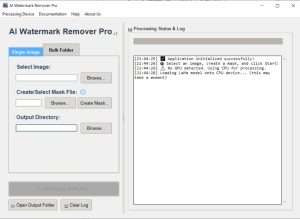
Intelligent Object Removal:
Automatically analyzes selected areas and reconstructs missing background
Neural networks trained on millions of images for realistic results
Maintains texture, lighting, and perspective consistency
Handles complex backgrounds with multiple elements
One-Click Simplicity:
Simply mask the unwanted object with brush tool
AI takes over to perform the removal magic
No manual cloning, healing, or complex selections required
Visual Mask Editor:
Draw masks directly over unwanted elements
Zoom in for pixel-perfect precision
Adjustable brush size for fine control
Eraser tool for mask refinement
Multiple Mask Support:
Select multiple objects in a single image
Complex selections with overlapping elements
Save and reuse masks for batch processing
Bulk Watermark Removal:
Apply the same mask to entire folders of images
Process hundreds of photos automatically
Consistent results across image sets
Ideal for e-commerce catalogs and photo libraries
Watermarks & Logos:
Remove text watermarks (copyright notices, website URLs)
Eliminate complex logo graphics
Clean up image credits and attribution text
Objects & People:
Remove tourists and bystanders from travel photos
Eliminate distracting background elements
Clean up product photography by removing unwanted items
Text & Timestamps:
Remove date stamps from old photographs
Eliminate subtitles and overlaid text
Clean up memes and social media graphics
Photo Restoration:
Remove scratches and dust spots
Eliminate creases from scanned photos
Repair blemishes and imperfections
Restore old family photographs
Local Processing:
All AI computation performed on your computer
No images ever uploaded to cloud servers
No internet connection required for processing
Complete data privacy and security
Offline Capability:
Works entirely without internet access
Perfect for sensitive or confidential images
No dependency on cloud services
NVIDIA CUDA Support:
Significantly faster processing with compatible NVIDIA GPUs
Real-time preview and faster batch processing
Hardware acceleration for complex images
Fallback to CPU for systems without compatible GPU
Compatible Image Formats:
PNG – Portable Network Graphics (with transparency)
JPEG/JPG – Standard photographic format
BMP – Windows Bitmap
WEBP – Modern web-optimized format
TIFF – High-quality format for professional use
Enhanced AI Model – Improved background reconstruction accuracy
Faster Processing – Optimized algorithms for quicker results
GPU Acceleration Updates – Expanded NVIDIA CUDA support
UI/UX Refinements – Streamlined workflow with clearer controls
Mask Editor Improvements – More precise brush and eraser tools
Format Support Expansion – Additional compatibility for WEBP and TIFF
Performance Optimizations – Reduced memory usage
Stability Enhancements – Bug fixes and reliability improvements
OS: Windows 10 version 17763.0 or higher
CPU: x64 architecture, Quad-core processor
RAM: 8 GB
Video Memory: 1 GB (for basic GPU acceleration)
Storage: Sufficient space for images and software
Price: 125 $
Price Currency: $
Operating System: Windows
Application Category: Graphics
Latest update
License Price
OS












Reviews
There are no reviews yet.