

Latest update
License Price
OS
Alteryx Designer is the industry-leading data preparation and analytics automation platform that empowers analysts to prepare, blend, and analyze data from virtually any source—all through an intuitive, drag-and-drop interface. With over 300 no-code/low-code building blocks, Alteryx Designer transforms the traditional analytics workflow, automating every step from data ingestion and cleansing to advanced predictive modeling and output delivery. Version 2025.2.1.85 continues Alteryx’s mission of democratizing data analytics, enabling users to spend less time on manual data manipulation and more time on deriving actionable insights. Whether connecting to spreadsheets, cloud sources, databases, or unstructured data, Alteryx Designer delivers the speed, scalability, and sophistication that modern data-driven organizations demand.
alteryx designer 2025.2
This professional data analytics software is designed for:
Data Analysts & Business Intelligence Professionals preparing, blending, and analyzing data from multiple sources.
Data Scientists & Advanced Analysts performing predictive analytics and machine learning without extensive coding.
Finance & Accounting Teams automating financial reporting, reconciliation, and analysis workflows.
Marketing & Sales Analysts analyzing customer data, campaign performance, and market trends.
Operations & Supply Chain Professionals optimizing processes through data-driven insights.
Data Connection & Integration:
Connect to 80+ data sources including spreadsheets, databases, cloud platforms (Snowflake, AWS, Azure), and RPA bots
Import from structured and unstructured sources
Support for PDFs, text files, images, and web data
Direct connection to enterprise systems (Salesforce, Tableau, etc.)
Data Cleansing & Transformation:
300+ drag-and-drop tools for data manipulation
Remove duplicates, filter rows, and handle missing values
Parse, split, and transform data fields
Data type conversion and formatting
Fuzzy matching and data standardization
Data Blending:
Combine data from multiple sources
Union, join, and fuzzy match operations
Spatial data blending for location-based analytics
Time series alignment and aggregation
Predictive Analytics:
Assisted modeling for machine learning pipelines
Predictive modeling with just a few clicks
Classification, regression, and clustering algorithms
Time series forecasting and trend analysis
Statistical Analysis:
Descriptive statistics and hypothesis testing
Correlation analysis and ANOVA
Regression modeling
Sampling and probability distributions
Spatial Analytics:
Geocoding and reverse geocoding
Distance calculations and spatial joins
Territory creation and optimization
Map visualization and analysis
Drag-and-Drop Interface:
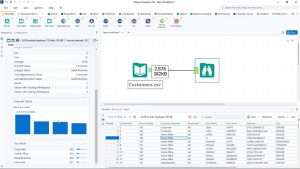
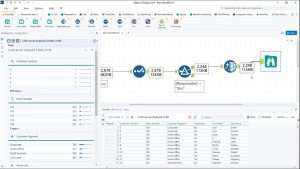
Visual canvas for building analytical workflows
Intuitive tool palette with categorized functions
Real-time data preview at each step
Workflow documentation built into the canvas
No-Code/Low-Code Development:
Build complex analytics without programming
Python and R integration for custom extensions
Macro creation for reusable workflows
Template-based development
Workflow Automation:
Schedule and automate analytical processes
Trigger workflows based on events or time
Output to 70+ tools including Tableau, Salesforce, RPA bots
Email and alert integration
Scalability:
Process large datasets efficiently
In-database processing for massive data volumes
Cloud and on-premises deployment options
Hybrid architecture for flexible scaling
Prescriptive Analytics:
Optimization and simulation capabilities
What-if analysis and scenario modeling
Decision optimization tools
Text Mining & Natural Language Processing:
Extract insights from unstructured text
Sentiment analysis and entity extraction
Topic modeling and text classification
Image Analytics:
Extract data from images
OCR (Optical Character Recognition) capabilities
Image classification and analysis
Interactive Data Profiling:
Real-time data quality assessment
Column statistics and distributions
Data lineage tracking
Anomaly detection
Visualization Integration:
Native charting and graphing tools
Integration with Tableau, Power BI, and other visualization platforms
Export to multiple reporting formats
Flexible Output Options:
Export to databases, spreadsheets, and cloud platforms
Generate reports in multiple formats (PDF, Excel, HTML)
Publish to Tableau Server/Online
Create data apps and interactive dashboards
Collaboration Features:
Share workflows and results with teams
Version control integration
Centralized workflow management with Alteryx Server
Comment and annotation capabilities
Python & R Integration:
Run custom Python and R scripts within workflows
Leverage open-source libraries
Create reusable code snippets
API Access:
Build custom connectors and tools
Integrate with enterprise systems
Extend functionality through APIs
Macro Creation:
Encapsulate complex logic in reusable macros
Share macros across teams
Standardize analytical processes
Enhanced AI-Assisted Modeling – Improved machine learning automation with expanded algorithm options
New Data Connectors – Additional cloud and enterprise source integrations
Performance Optimizations – Faster processing for large datasets
Python/R Integration Updates – Support for latest library versions
UI/UX Refinements – Streamlined workflow with improved tool organization
Expanded Output Options – Additional reporting and publishing formats
Security Enhancements – Updated authentication and encryption features
Stability Improvements – Bug fixes and reliability enhancements
Machine Architecture: 64-bit required
OS: Microsoft Windows 11 (64-bit) only
Processor Speed: 2.5 GHz or faster
RAM: 8 GB
Disk Size: 500 GB – 1 TB
Machine Architecture: 64-bit
OS: Microsoft Windows 11 (64-bit)
Chip/CPU: 4 Core minimum
Processor Speed: 2.5 GHz or faster
RAM: 16 GB
Disk Size: 500 GB – 1 TB
Price: 145 $
Price Currency: $
Operating System: Windows
Application Category: Data Analysis
Latest update
License Price
OS


Reviews
There are no reviews yet.