

Latest update
License Price
OS
BETA CAE Systems Suite represents the pinnacle of integrated engineering simulation software—providing a complete, solver-independent environment for the entire CAE workflow. Comprising three flagship products—ANSA for advanced pre-processing, META Post for powerful post-processing, and CAD Translator for seamless data exchange—the suite enables engineers to prepare geometry, generate high-quality meshes, define simulation models, analyze results, and generate reports within a unified ecosystem. Version 2026 v25.1.4 continues BETA CAE’s legacy of innovation with enhanced performance, expanded solver support, and advanced automation capabilities. Trusted by leading automotive, aerospace, and industrial manufacturers worldwide, the BETA CAE Suite delivers the accuracy, efficiency, and reliability demanded by the most challenging simulation projects.
This comprehensive CAE software suite is designed for:
CAE Analysts & Simulation Engineers performing finite element analysis, computational fluid dynamics, and multi-physics simulations.
Automotive & Aerospace Engineers conducting crashworthiness, durability, NVH, and aerodynamic simulations.
Structural & Mechanical Engineers analyzing complex assemblies under various loading conditions.
Design & Simulation Managers overseeing CAE workflows and ensuring model quality and consistency.
Research & Development Teams validating designs through virtual prototyping before physical testing.
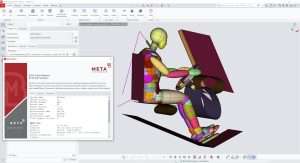
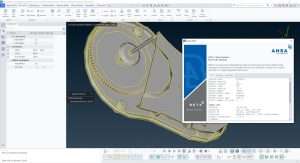
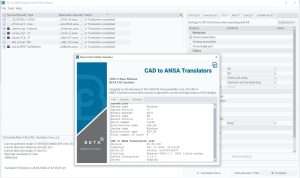
Geometry Handling & Cleanup:
Import and repair complex CAD geometries from all major sources
Advanced defeaturing to remove unnecessary details while preserving design intent
Mid-surface extraction for shell modeling of thin-walled structures
Geometry simplification and idealization for analysis
Support for solid and surface geometries
High-Quality Meshing:
Shell and solid meshing with superior element quality
Hexahedral, tetrahedral, and polyhedral meshing capabilities
Advanced mesh controls and local refinement tools
Batch meshing and template-based automation
Quality checks and mesh optimization
Model Preparation:
Define materials, properties, and sections
Assembly management for large, complex models
Modeling of connections (spot welds, seams, bolts, adhesives)
Load case and boundary condition definition
Solver-specific deck preparation
Automation & Customization:
Scripting for workflow automation
Parametric modeling capabilities
Template-based quality assurance
Consistent model quality through standards
Supported Analysis Types:
Structural analysis (linear/nonlinear)
Crash and impact simulation
NVH (Noise, Vibration, Harshness)
Computational Fluid Dynamics (CFD)
Durability and fatigue analysis
Thermal analysis
Multi-physics simulations
Result Visualization:
High-performance handling of large result datasets
Contour plots, animations, and time-history graphs
Deformed shape display and vector plots
Multi-model and multi-result comparison
Section cuts and probing tools
Data Analysis:
Advanced filtering and result extraction
Mathematical operations on result data
Fatigue, durability, and correlation studies
Modal analysis and frequency response visualization
Custom result calculations
Reporting & Presentation:
Automated report generation
Customizable charts and layouts
Image and animation export
Consistent, professional presentation of simulation results
Solver Support:
Compatible with all major solvers (LS-DYNA, Nastran, Abaqus, Pam-Crash, Radios, Ansys, CFD solvers, and many more)
Native result format reading
Solver-neutral environment
Multi-Format Support:
Native CAD formats: CATIA, NX, Creo, SolidWorks, Inventor, JT
Neutral formats: STEP, IGES, Parasolid, ACIS
Direct integration with major CAD systems
Reliable Translation:
Preserve geometric integrity and topology
Maintain assembly structure, layers, and attributes
Unit and tolerance management
Minimize translation errors and data loss
Design-Analysis Integration:
Bridge between design and simulation teams
Consistent geometry across the product lifecycle
Support for heterogeneous CAD environments
Full-vehicle crash simulation model preparation
Body-in-white meshing for NVH and durability
Occupant safety system modeling
Aerodynamic CFD mesh generation
Powertrain and thermal management simulations
Airframe structural analysis models
Composite material modeling
Engine and component thermal analysis
Landing gear and mechanism simulation
Bird strike and impact analysis
Large assembly meshing and management
Hydraulic system simulation
Structural integrity and fatigue analysis
Motion and multi-body dynamics
Wind turbine blade modeling
Nuclear and thermal power plant components
Oil and gas equipment analysis
Renewable energy system simulation
Drop test and impact simulation
Plastic part molding analysis
Packaging and shipping simulation
Product durability testing
Optimized for multi-core processors
64-bit architecture for large model handling
GPU acceleration for visualization
Distributed computing support
Scalable from desktop to HPC environments
Scripting APIs for custom workflows
Integration with PLM/PDM systems
Job submission to HPC clusters
Automated quality checks and reporting
Template-based standardization
Enhanced Meshing Algorithms – Faster and higher-quality mesh generation for complex geometries
Expanded Solver Support – Latest versions of LS-DYNA, Abaqus, Nastran, and CFD solvers
ANSA Automation Improvements – New scripting capabilities and template enhancements
META Post Performance Boost – Faster loading and visualization of large result datasets
CAD Translator Updates – Support for latest CAD format versions
NVH Analysis Enhancements – Improved tools for noise and vibration simulation
Composite Modeling Upgrades – Better handling of layered materials
UI/UX Refinements – Streamlined workflow with improved tool organization
Batch Processing Optimizations – More efficient handling of multiple models
Stability Improvements – Bug fixes and reliability enhancements
Processor: Multi-core processor (64-bit architecture recommended)
RAM: Minimum 16 GB (32 GB or more recommended for large models)
Graphics: Dedicated graphics card supporting modern OpenGL standards
Storage: High-speed storage (SSD recommended for large datasets)
Network: Gigabit Ethernet for distributed computing and license server access
OS: 64-bit Windows 10/11
Graphics Drivers: Properly installed and updated graphics drivers
License Management: Configured license server for network licensing
Additional: Scripting environment for automation (optional)
Price: 125 $
Price Currency: $
Operating System: Windows
Application Category: Mechanical Engineering
Latest update
License Price
OS




Reviews
There are no reviews yet.