

Latest update
License Price
OS
Capture is a powerful yet intuitive lighting design, documentation, and visualization software that seamlessly integrates the entire creative workflow—from initial concept to final documentation. Native to both macOS and Windows, Capture goes beyond traditional lighting design tools by supporting multiple effect types including lighting fixtures, video projection, lasers, moving scenery, and water effects—all within a unified environment. What truly distinguishes Capture is its unprecedented ease of use and the ability to fluidly switch between design, documentation, and visualization modes without disrupting creative flow. This flexibility encourages designers to experiment with new workflows, discover faster working methods, and maintain creative momentum throughout the project lifecycle. Version 2025.1.15 introduces significant usability enhancements including descriptive undo/redo commands, automatic recovery of unsaved changes, and improved 3D navigation hardware support.
This professional lighting design software is designed for:
Lighting Designers & Consultants creating comprehensive lighting plans for architectural, theatrical, and event applications.
Entertainment & Stage Lighting Professionals designing shows, concerts, and theatrical productions.
Architectural Lighting Specialists integrating lighting into building designs with precise documentation.
Event & Exhibition Designers planning temporary installations with lighting, video, and scenic elements.
Lighting Programmers & Technicians visualizing and pre-programming complex lighting systems before installation.
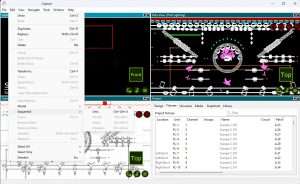
Comprehensive Element Support:
Lighting Fixtures: Extensive library of theatrical, architectural, and entertainment lighting
Video Systems: Projectors, LED screens, and media servers with video mapping
Laser Effects: Beam and aerial laser effects with accurate physics simulation
Moving Scenery: Automated scenic elements with motion control
Water Effects: Fountains, water screens, and interactive water features
Seamless Mode Switching:
Effortlessly transition between design, documentation, and visualization
Maintain context and creative flow across all project phases
Real-time updates across all views
2D Documentation:
Professional-quality lighting plots and plans
Automatic symbol generation and labeling
Layer-based organization for complex projects
Dimensioning and annotation tools
3D Visualization:
Real-time 3D rendering of lighting effects
Accurate photometric calculations
Beam visualization and light distribution analysis
Camera-based view creation for presentations
Adaptable to different design processes and methodologies
Encourage experimentation with new workflow approaches
Support for both top-down design and bottom-up programming
Integration with industry-standard file formats
Automated paperwork generation (instrument schedules, channel hookups)
Custom report creation
PDF and printed output
Integration with Vectorworks and other CAD platforms
New in 2025.1.15:
Descriptive Undo/Redo: Clear, contextual menu descriptions (e.g., “Undo Delete,” “Redo Hide Grid”)
Unsaved Changes Recovery: Automatic backup and recovery in case of unexpected shutdown
Optimized Memory Usage: Undo/redo data stored on disk instead of RAM for lower memory footprint
Improved 3D Navigation: Updated 3Dconnexion device support with modern API for advanced navigation
Descriptive Undo/Redo Commands – Clear, contextual descriptions in menu (e.g., “Undo Delete,” “Redo Hide Grid”)
Unsaved Changes Recovery – Automatic recovery after unexpected shutdown with disk-based undo/redo storage
Reduced Memory Usage – Undo/redo data stored on disk instead of RAM
Updated 3Dconnexion Support – Modern API integration for advanced 3D navigation
Import Options from Capture 2024 – Automatic option import when first launching Capture 2025 with existing 2024 installation
Enhanced stability and performance optimizations
Refined user interface for improved workflow efficiency
Expanded fixture library with latest manufacturer profiles
Price: 145 $
Price Currency: $
Operating System: Windows
Application Category: Other Specialties
Latest update
License Price
OS










Reviews
There are no reviews yet.