

Latest update
License Price
OS
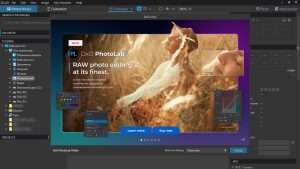
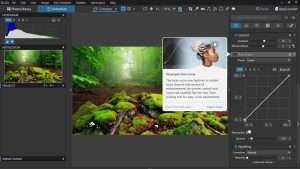
DxO PhotoLab Elite is widely recognized as one of the most advanced RAW image processing applications available combining scientific rigor with artistic control to deliver unparalleled image quality. Developed by DxO Labs, a company renowned for its deep research in digital imaging and optical performance, PhotoLab Elite leverages an extensive database of camera and lens profiles to provide automatic, scientifically precise corrections that no other software can match. Version 9.5.0.610 continues DxO’s legacy of innovation with the latest iterations of its groundbreaking DeepPRIME and DeepPRIME XD noise reduction technologies, intelligent lighting tools, intuitive U-Point local adjustments, and a completely non-destructive workflow that preserves original RAW files while enabling unlimited creative exploration. For photographers who refuse to compromise on image quality, DxO PhotoLab Elite is not merely software—it is the scientific foundation of exceptional photography.
This professional RAW image processing software is designed for:
Professional Photographers & Serious Enthusiasts demanding the highest possible image quality from their RAW files.
Landscape & Architecture Photographers benefiting from exceptional optical corrections and lens profile support.
Low-Light & Astrophotography Specialists leveraging industry-leading noise reduction technology.
Studio & Commercial Photographers needing precise color rendering and non-destructive workflow.
Photo Editors & Retouchers seeking advanced local adjustments without complex masking.
DeepPRIME Technology:
AI-powered noise reduction applied during RAW conversion
Dramatically reduces noise while preserving fine detail
Recovers color accuracy and texture in high-ISO images
Transforms impossible low-light shots into usable images
DeepPRIME XD (eXtra Detail):
Advanced version capable of extracting additional fine detail
Enhanced noise reduction with superior texture preservation
Ideal for astrophotography, wildlife, and critical detail work
Pushes image quality beyond conventional limits
Computational Requirements:
Optimized for modern multi-core processors
GPU acceleration for faster processing
Significantly improves with higher-performance hardware
Balance of speed and quality for production workflows
Lens & Camera Profiles:
Extensive database of camera and lens combinations
Automatically applies corrections specific to your equipment
Corrects distortion, chromatic aberration, and vignetting
Restores sharpness and optical quality
Automatic Corrections:
Distortion correction for precise geometry
Chromatic aberration removal for clean edges
Vignetting compensation for even illumination
Sharpness optimization based on lens characteristics
Precision Engineering:
Based on DxO’s deep research in optical performance
Scientifically measured corrections, not approximations
Match your exact camera and lens combination
Unmatched accuracy in optical correction
Camera Color Profiles:
Accurate color reproduction matching camera characteristics
Profiles for major camera brands and models
Preserves natural color while enabling creative adjustments
Film Simulations:
Emulate classic film stocks with authentic color rendering
Add creative character while maintaining quality
Extensive library of film presets
Color Adjustment Tools:
Precise color wheel and curve controls
HSL (Hue, Saturation, Luminance) adjustments
Split toning for creative color grading
White balance fine-tuning
Smart Lighting:
Dynamically balances exposure across the image
Recovers highlight and shadow detail naturally
Maintains realistic appearance while expanding dynamic range
One-click intelligent exposure optimization
ClearView Plus:
Removes atmospheric haze and fog
Enhances local contrast for landscapes
Adds depth and clarity to outdoor scenes
Adjustable intensity for natural results
Selective Tone Control:
Independent adjustment of highlights, midtones, and shadows
Precise control over tonal distribution
Recover detail in challenging lighting
Fine-tune contrast and mood
Intuitive Control Points:
Apply adjustments to specific areas without complex masking
Place control points on the image and adjust radius
Smart technology detects similar areas automatically
Perfect for selective editing with minimal effort
Local Adjustment Tools:
Exposure, contrast, and saturation local controls
Sharpening and noise reduction by area
Color and white balance adjustments
Dodge and burn with precision
No Masking Required:
Eliminates tedious manual masking
Intuitive visual workflow
Perfect for photographers who hate complex selections
Professional results with minimal time investment
Geometry & Perspective:
Horizon straightening and leveling
Perspective correction for architecture
Keystone distortion adjustment
Precise cropping tools
Repair & Clone Tools:
Remove spots, dust, and distractions
Clone areas for seamless cleanup
Heal imperfections naturally
Non-destructive repair workflow
Sharpening & Detail:
Global and local sharpening controls
Detail enhancement for critical areas
Avoid common sharpening artifacts
Output-specific sharpening options
Preserve RAW Files:
All edits saved as instructions, not applied to original
Original RAW file remains untouched
Unlimited undo and revision capability
Experiment freely without risk
Sidecar Files:
Edit metadata saved in .dop files
Portable and shareable edit settings
Backup and sync edits across systems
Compatible with version control workflows
Batch Processing:
Apply consistent edits to multiple images
Synchronize settings across selections
Efficient workflow for large shoots
Maintain consistency across image sets
Customizable Workspaces:
Arrange panels and tools to match your workflow
Save multiple workspace configurations
Show/hide tools as needed
Optimize for different editing tasks
Image Browser:
Star ratings and color labels for organization
Filter and sort images efficiently
Quick preview and selection tools
Integration with external cataloging systems
Standalone or Plugin:
Run as independent application
Integrate as plugin with Adobe Lightroom Classic
Flexible workflow options
Round-trip editing capability
Export Options:
TIFF, JPEG, DNG output formats
Direct printing from application
Export to external applications
Customizable output settings
Enhanced DeepPRIME XD – Improved detail extraction with better noise reduction
New Camera & Lens Profiles – Expanded database with latest equipment support
U-Point Tool Refinements – More precise local adjustments with better edge detection
ClearView Plus Updates – Improved haze removal with natural results
Performance Optimizations – Faster processing with DeepPRIME technologies
UI/UX Refinements – Streamlined workspace with improved tool organization
Export Format Updates – Enhanced compatibility with latest applications
Stability Improvements – Bug fixes and reliability enhancements
RAW Format Support – Compatibility with latest camera RAW formats
OS: Windows 10 (64-bit) or Windows 11
CPU: Intel Core i5 (quad-core) or AMD equivalent
RAM: 8 GB
GPU: OpenCL 1.2 support with 2 GB VRAM
Storage: 4 GB available space (SSD recommended)
Display: 1280 × 800 minimum resolution
OS: Windows 11 (64-bit)
CPU: Intel Core i7/i9 or AMD Ryzen 7/9 (6+ cores)
RAM: 16 GB or more (32 GB+ for large batches)
GPU: OpenCL 1.2+ with 4 GB+ VRAM (for DeepPRIME XD acceleration)
Storage: 20 GB SSD for fast processing
Display: 1920 × 1080 resolution or higher
Price: 125 $
Price Currency: $
Operating System: Windows
Application Category: Graphics
Latest update
License Price
OS








Reviews
There are no reviews yet.