

Latest update
License Price
OS
Film Impact Premium Video Effects is a powerful, professionally-crafted collection of over 70 GPU-accelerated transitions and video effects exclusively for Adobe Premiere Pro. Renowned for its intuitive visual design and broadcast-quality results, Film Impact delivers cinematic polish without complexity—enabling editors to apply sophisticated transitions like Impact Push, Impact Zoom, Impact Stretch, and Impact 3D Flip with simple drag-and-drop efficiency. Version 25.2.10 continues the suite’s tradition of balancing creative sophistication with workflow speed, featuring real-time previews, extensive preset libraries, and seamless integration into Premiere Pro’s native effects panel. For editors who demand high-end transitions without leaving their timeline, Film Impact Premium is the essential toolkit.
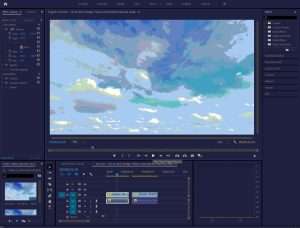
Signature Transitions:
Impact Push: Smooth, directional pushes with customizable easing and motion blur.
Impact Zoom: Dynamic zoom transitions with precise focus and speed control.
Impact Stretch: Elastic, warped transitions for energetic content.
Impact 3D Flip: True 3D page turns and flips with perspective control.
Impact Glow Dissolve: Soft, luminous dissolves with glow intensity adjustment.
Impact Radial Blur: Directional blur transitions with spin and zoom variations.
Impact Roll: Cylindrical rolling transitions for unique visual flair.
Impact Spin: 3D rotational transitions with customizable axes.
Categories:
3D Transitions: Spatial flips, rolls, and rotations.
Blur & Glow: Soft focus, radial blur, and luminous dissolves.
Distortion: Warp, stretch, and elastic effects.
Slide & Push: Directional movement with motion blur.
Wipe & Iris: Classic wipes with modern polish.
Zoom & Magnify: Dynamic scale-based transitions.
Real-Time Playback: Instant preview without rendering—adjust parameters on the fly.
Multi-Frame Rendering: Optimized for Adobe Premiere Pro’s rendering engine.
4K-8K Support: Full resolution capability for high-end production.
Efficient Memory Usage: Lightweight footprint even with multiple stacked effects.
Visual Parameter Adjustment: Direct manipulation of transition properties within Program Monitor.
Easing Curves: Customizable acceleration and deceleration for natural motion.
Motion Blur Control: Adjustable shutter angle for realistic or stylized blur.
Color Management: Built-in color handling for consistent results across projects.
200+ Included Presets: Ready-to-use variations for every transition type.
Custom Preset Saving: Save personalized settings for future projects.
Organized Categories: Easily browse presets by style and intensity.
One-Click Application: Apply complex transitions instantly.
Native Effects Panel: All transitions appear in Premiere Pro’s standard effects browser.
Drag-and-Drop Workflow: Apply directly to timeline cuts or between clips.
Keyframe Support: Full animation control via Premiere’s keyframe system.
Adjustment Layer Compatible: Apply to multiple clips simultaneously.
Project Interchange: Presets and customizations transfer across systems.
Customizable Direction: Control transition orientation (left/right, up/down, radial).
Duration Adjustment: Precise timing control down to individual frames.
Edge Blending: Clean, artifact-free transitions with proper edge handling.
Opacity & Blend Modes: Additional compositing flexibility.
No Pre-Rendering Required: Real-time preview enables rapid creative exploration.
Batch Application: Apply consistent transitions across multiple edit points.
Template Creation: Build reusable transition templates for series or episodes.
Undo/Redo Support: Full integration with Premiere’s history system.
Adobe Premiere Pro 2025 Compatibility – Certified support for latest Premiere release
Enhanced GPU Performance – Optimized rendering for NVIDIA RTX and AMD Radeon Pro cards
New Transition Presets – 25+ additional variations for existing transition types
Improved Motion Blur – More accurate shutter-angle simulation
UI Refinements – Streamlined on-screen controls for faster adjustment
4K Playback Optimization – Smoother real-time preview at Ultra HD resolutions
Preset Library Expansion – Additional category organization and search functionality
Stability Improvements – Bug fixes and performance enhancements
OS: Windows 10 (64-bit) / macOS 10.15 (Catalina) or later
Host Application: Adobe Premiere Pro 2021 (v15) or later
CPU: Intel Core i5 or AMD equivalent
RAM: 8 GB
GPU: 2 GB VRAM, DirectX 12 compatible (NVIDIA/AMD)
Storage: 1 GB free space
OS: Windows 11 / macOS Monterey or later
Host Application: Adobe Premiere Pro 2024/2025 (latest version)
CPU: Intel Core i7 / AMD Ryzen 7 or higher
RAM: 16 GB or more
GPU: 4+ GB VRAM (NVIDIA RTX series / AMD Radeon Pro)
Storage: SSD for optimal performance
Adobe Premiere Pro 2021 (v15)
Adobe Premiere Pro 2022 (v22)
Adobe Premiere Pro 2023 (v23)
Adobe Premiere Pro 2024 (v24)
Adobe Premiere Pro 2025 (v25)
Price: 125 $
Price Currency: $
Operating System: Windows
Application Category: Video
Latest update
License Price
OS









Reviews
There are no reviews yet.