

Latest update
License Price
OS
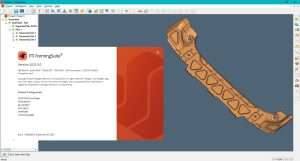
FTI FormingSuite is the industry’s most comprehensive sheet metal forming simulation software, enabling manufacturers to digitally validate, optimize, and perfect forming processes before committing to physical tooling and production. Developed by Forming Technologies Incorporated (FTI), a Hexagon company, FormingSuite has become the global standard for stamping simulation across automotive, aerospace, appliance, and general manufacturing industries. Version 2025.3 represents a significant advancement in simulation accuracy, solver performance, and usability—empowering engineers to predict and eliminate defects such as tearing, wrinkling, thinning, and springback before the first physical part is ever formed. By replacing costly physical trial-and-error with accurate virtual prototyping, FormingSuite dramatically reduces tooling costs, development time, material waste, and production delays while ensuring consistent, high-quality formed parts.
This professional metal forming simulation software is designed for:
Manufacturing Engineers & Process Planners optimizing sheet metal forming processes for automotive, aerospace, and industrial applications.
Tool & Die Designers developing and validating die geometries before physical tool manufacturing.
Automotive Body Engineers designing and validating body panels, structural components, and closure systems.
Aerospace Manufacturing Specialists forming complex structural components with lightweight alloys.
Stamping & Fabrication Professionals reducing scrap, minimizing defects, and improving part quality.
Defect Prediction:
Predict tearing, wrinkling, and excessive thinning before tool construction
Identify high-risk areas using Forming Limit Diagrams (FLD)
Evaluate strain distribution across entire part geometry
Detect and visualize potential failure zones
Forming Limit Diagrams:
Industry-standard FLD visualization
Multiple failure criteria options
Safety margin calculation and display
Material-specific forming limit curves
Rapid Feasibility Studies:
Quick simulation without complex die setup
Early-stage product development validation
Blank shape estimation from final part geometry
Formability assessment in minutes
Ideal for:
Quoting and estimating
Initial design concept validation
Material selection studies
Cost estimation
Advanced Die Process Simulation:
Simulate complex multi-stage forming operations
Support for progressive dies, transfer presses, and tandem lines
Model draw, restrike, trim, flange, and pierce operations
Accurate springback prediction and compensation
Process Capabilities:
Draw and form operations
Trimming and piercing
Flanging and hemming
Cam and slide operations
Multi-stage forming sequences
Optimal Blank Calculation:
Determine minimum blank size for each part
Nesting optimization for material utilization
Reduce scrap through intelligent blank layout
Support for multiple blanks and coil-fed operations
Nesting Tools:
Automatic blank nesting on coil or sheet
Manual override and adjustment
Material utilization reports
Cost-per-part calculation
Springback Prediction:
Accurately predict part distortion after unloading
Elastic recovery calculation
Residual stress analysis
Dimensional accuracy assessment
Die Compensation:
Automatically compensate die geometry for springback
Iterative compensation algorithms
Validate compensated design through re-simulation
Achieve first-part accuracy
Addendum Surface Creation:
Design binder and addendum surfaces
Draw bead modeling and optimization
Surface modification and refinement
Tool surface preparation
Draw Bead Design:
Model draw bead resistance
Optimize bead geometry for material flow control
Predict and validate bead performance
Comprehensive Material Library:
Steels (mild, high-strength, advanced high-strength)
Aluminum alloys (5000, 6000, 7000 series)
Stainless steels
Copper, brass, and specialty alloys
Custom material definition
Advanced Material Models:
Anisotropic yield criteria (Hill, Barlat, Vegter)
Hardening models (isotropic, kinematic, mixed)
Strain rate sensitivity
Temperature-dependent properties
Material Cost Analysis:
Blank weight and material cost calculation
Scrap percentage and waste analysis
Multi-part nesting economics
Coil utilization optimization
Process Costing:
Tooling cost estimation
Production cycle time analysis
ROI comparison between process options
Cost-per-part reporting
Result Visualization:
Color contour plots for strain, thickness, stress
Forming Limit Diagram overlay on 3D geometry
Section cuts and measurement tools
Forming process animation
Engineering Reports:
Exportable engineering documentation
Customizable report templates
PDF and HTML output formats
Comparison charts and summaries
Import Formats:
STEP, IGES, Parasolid, SAT
Native CAD formats (CATIA, NX, SolidWorks, Creo)
Direct geometry import with topology healing
Mesh generation and refinement tools
Geometry Tools:
Surface cleanup and repair
Mid-surface extraction
Mesh generation and quality improvement
Feature suppression and defeaturing
Enhanced Solver Performance – Faster incremental simulations with multi-core optimization
Improved Springback Compensation – More accurate algorithms with fewer iterations
Expanded Material Library – Additional AHSS and aluminum grades with latest characterization data
Advanced Draw Bead Modeling – More accurate resistance prediction and optimization
Blank Nesting Enhancements – Improved algorithms for higher material utilization
UI/UX Modernization – Streamlined workflow with customizable workspaces
Reporting Module Upgrades – More flexible templates and visualization options
CAD Integration Improvements – Faster import with better geometry healing
Multi-Physics Coupling – Initial integration with thermal effects for hot forming
API Enhancements – Extended automation and customization capabilities
OS: Windows 10 (64-bit)
CPU: Intel Core i5 or equivalent
RAM: 16 GB
Graphics: Dedicated GPU with OpenGL support
Storage: 50 GB free space
Display: 1920 × 1080 resolution
OS: Windows 11 (64-bit)
CPU: Intel Core i7/i9/Xeon or AMD Ryzen 7/9/Threadripper
RAM: 32–64 GB (higher for large automotive panels)
Graphics: NVIDIA Quadro RTX/RTX A-series or GeForce RTX (8GB+ VRAM)
Storage: 100 GB NVMe SSD for simulation data
Display: Dual 4K monitors for optimal workflow
Price: 125 $
Price Currency: $
Operating System: Windows
Application Category: Manufacturing
Latest update
License Price
OS











Reviews
There are no reviews yet.