

Latest update
License Price
OS
Frame0 revolutionizes the wireframing process by combining the charm and clarity of hand-drawn aesthetics with the speed and precision of modern software—enhanced by an intelligent AI Agent that dramatically accelerates concept-to-prototype workflows. Unlike traditional wireframing tools that can feel sterile or overly complex, Frame0 embraces a beautiful, sketch-like visual language that communicates “work in progress” while maintaining professional clarity. Version 1.5.0 introduces an AI Agent that actively assists in creating wireframes, suggesting components, layouts, and refinements based on your design intent saving even more time while preserving creative control. For anyone who needs to transform ideas into visual prototypes quickly, whether for modern web applications, mobile apps, or software interfaces, Frame0 delivers an effortless, enjoyable wireframing experience.
This innovative wireframing software is designed for:
UI/UX Designers & Product Managers creating rapid, hand-drawn style wireframes for applications and websites.
Startup Founders & Entrepreneurs visualizing app concepts quickly without complex design tools.
Front-End Developers & Web Designers prototyping user interfaces before committing to code.
Product Teams & Agencies collaborating on early-stage concepts with minimal friction.
Educators & Students teaching and learning interface design principles with an accessible tool.
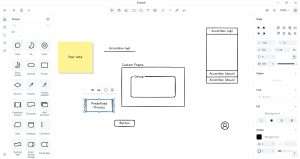
Beautiful Sketch Style:
Deliberately imperfect, hand-rendered visual language
Communicates “concept” rather than “final design”
Reduces stakeholder fixation on minor visual details
Professional clarity with artistic warmth
Consistent Visual Language:
All components share the same hand-drawn aesthetic
UI elements look like they were sketched by the same hand
Cohesive prototypes that tell a clear story
Perfect for early-stage presentations and user testing
Intelligent Wireframing:
AI Agent that understands your design intent
Suggests appropriate components and layouts
Accelerates the transition from concept to prototype
Learns from your preferences over time
Time-Saving Automation:
Generate common UI patterns instantly
AI-powered component placement suggestions
Smart layout recommendations
Reduce repetitive wireframing tasks
Creative Partnership:
AI as collaborator, not replacement
Maintain full creative control
Explore alternative layouts quickly
Inspiration when you need it most
Modern UI Elements:
Buttons, forms, navigation bars, cards
Input fields, checkboxes, radio buttons, toggles
Modals, popovers, tooltips, notifications
Icons and symbols in matching hand-drawn style
Application Patterns:
Dashboard layouts and data visualization
Mobile app screens and navigation flows
Web page structures and landing pages
Complex interface patterns made simple
Custom Components:
Create and save your own components
Build a personalized library over time
Share components with team members
Consistent across all your projects
Adjustable Aesthetics:
Control sketch intensity and roughness
Customize line weight and style
Adjust color palettes for emphasis
Balance between sketch and clarity
Annotation Tools:
Add notes and comments directly on wireframes
Callouts for explaining functionality
Flow arrows and connection indicators
Perfect for design reviews and handoffs
Export Options:
PNG, SVG, and PDF export
Copy to clipboard for quick sharing
Embed in presentations and documents
Print-ready output
Collaboration Features:
Share wireframes with team members
Collect feedback and comments
Version history for tracking changes
Real-time collaboration (depending on platform)
Desktop Applications:
Native apps for Windows, macOS, and Linux
Full-featured offline access
Optimized for desktop workflows
Web Version:
Browser-based access from anywhere
No installation required
Perfect for quick sessions and collaboration
AI Agent Integration – Intelligent assistant that suggests components and layouts
Expanded Component Library – Dozens of new UI elements added
Enhanced Hand-Drawn Aesthetics – Refined sketch rendering for better clarity
Smart Layout Suggestions – AI-powered recommendations for component placement
Performance Optimizations – Faster rendering and smoother interaction
UI/UX Refinements – Streamlined interface with improved workflow
Export Format Updates – Additional format support and higher quality output
Stability Improvements – Bug fixes and reliability enhancements
Cross-Platform Sync – Seamless experience across desktop and web versions
Team Collaboration Tools – Enhanced sharing and feedback capabilities
OS: Windows 10/11 (64-bit)
RAM: 2 GB minimum (4 GB recommended)
Storage: 300 MB free space
Display: 1280 × 720 resolution or higher
Price: 0 $
Price Currency: $
Operating System: Windows
Application Category: Computer Graphics
Latest update
License Price
OS









Reviews
There are no reviews yet.