

Latest update
License Price
OS
Fritzing is a user-friendly Electronic Design Automation (EDA) software specifically developed to bridge the gap between physical breadboard prototyping and professional PCB manufacturing. Unlike complex industrial EDA tools, Fritzing provides an intuitive, visual environment where users can design circuits exactly as they appear on a physical breadboard, with automatic generation of schematic diagrams and PCB layouts. The software’s three-view architecture—Breadboard, Schematic, and PCB—works in perfect synchronization, enabling seamless transition from concept to manufacturable circuit board. Widely adopted in education, maker communities, and Arduino ecosystems, Fritzing democratizes electronics design by making professional-grade PCB development accessible to users with no formal engineering training.
This accessible electronics design software is designed for:
Students & Educators learning electronics fundamentals and circuit design principles.
Makers, Hobbyists & DIY Enthusiasts prototyping Arduino and Raspberry Pi projects.
Electronics Instructors & STEM Teachers creating visual teaching materials and lab exercises.
Rapid Prototypers & Product Designers documenting and transitioning breadboard circuits to PCB layouts.
Open Hardware Developers sharing complete, reproducible project documentation.
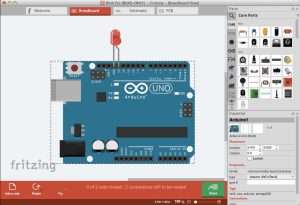
1. Breadboard View
Design circuits exactly as they appear on physical breadboards.
Drag-and-drop component placement with realistic visual representation.
Extensive library of popular components: Arduino boards, Raspberry Pi HATs, sensors, LEDs, resistors, ICs, and modules.
Virtual wiring that mimics real breadboard connections.
Ideal for beginners transitioning from physical prototyping to digital design.
2. Schematic View
Automatically generated from Breadboard View with complete electrical accuracy.
Traditional engineering-style schematic representation.
Clear visualization of electrical connections and signal flow.
Essential for documentation, troubleshooting, and professional presentation.
3. PCB View
Transform breadboard prototypes into custom printed circuit boards.
Manual and autorouting options for trace placement.
Define board shape, size, and layer configuration.
Support for single and double-sided PCB layouts.
Component placement optimization for compact designs.
Extensive Built-in Library: Thousands of pre-built components including Arduino Uno/Nano/Mega, Raspberry Pi, sensors (ultrasonic, temperature, PIR), actuators (servos, motors, relays), passive components, and ICs.
Custom Part Creator: Design and import custom components with unique footprints, schematics, and PCB layouts.
Community Contributions: Access thousands of user-created parts via the Fritzing Parts Library.
Popular Platform Support: Dedicated support for Arduino shields, Raspberry Pi HATs, and common breakout boards.
Autorouting Engine: Automatic trace routing for rapid PCB layout generation.
Manual Trace Routing: Precise, hand-crafted trace placement for optimized designs.
Design Rule Checking: Basic DRC for manufacturing-ready output.
Multi-Layer Support: Single and double-sided PCB designs.
Copper Fill/Pour: Ground and power plane creation.
Solder Mask & Silkscreen: Professional PCB finishing options.
Gerber File Generation: Industry-standard RS-274X format for PCB fabrication.
PDF Export: High-quality schematics and board layouts for documentation.
SVG/PNG Export: Vector and raster images for web sharing and printing.
Bill of Materials (BOM): Automatic component list generation.
Pick-and-Place Files: Component location data for automated assembly.
Project Sharing: Native .fzz format for complete project preservation and collaboration.
Improved Autorouter: Enhanced trace routing algorithms for cleaner, more efficient PCB layouts.
Expanded Component Library: Added support for latest Arduino R4 boards, Raspberry Pi 5, and recent sensor modules.
Bug Fixes: Resolved GDSII export issues and improved Gerber generation reliability.
Performance Optimizations: Faster load times for large projects and complex schematics.
UI Refinements: Streamlined parts bin organization and improved search functionality.
Custom Part Workflow: Simplified process for creating and importing custom components.
OpenGL Rendering: Improved graphics performance for smoother pan/zoom operations.
OS: Windows 10 (64-bit) or newer
CPU: Dual-core processor @ 2.0 GHz
RAM: 4 GB
Storage: 500 MB free disk space
Graphics: Basic integrated graphics with OpenGL support
OS: Windows 10 or Windows 11 (64-bit)
CPU: Quad-core processor @ 2.5 GHz or higher
RAM: 8 GB or more
Storage: 1 GB free disk space
Graphics: Dedicated or high-performance integrated GPU
Price: 125 $
Price Currency: $
Operating System: Windows
Application Category: Electronics
Latest update
License Price
OS








Reviews
There are no reviews yet.