
Gilisoft Image Editor is a versatile, all-in-one image editing and graphic design software. It combines a wide array of photo correction tools, artistic filters, drawing capabilities, and graphic design templates into a single, accessible package. Aimed at users who want more power than basic paint programs but less complexity than professional suites, it provides a practical solution for everyday image editing tasks, meme creation, social media graphics, and photo enhancement.
Gilisoft Image Editor is developed for photography enthusiasts, social media content creators, small business owners, and general users. It is specifically designed for individuals who need a comprehensive yet user-friendly desktop application for photo editing, graphic design, and basic image creation without the complexity of professional software like Photoshop.
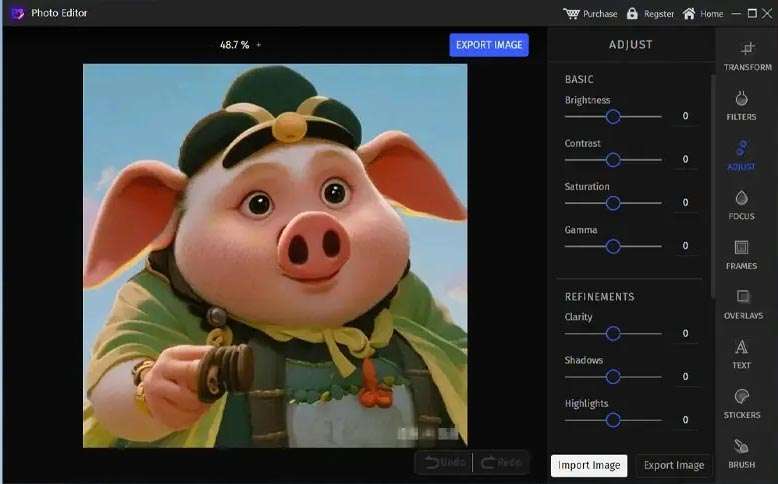
Basic Adjustments: Crop, rotate, resize, auto-enhance, and manual controls for brightness, contrast, hue, saturation, and levels.
Retouching Tools: Red-eye removal, blemish/healing brush, clone stamp, teeth whitening, and skin smoothing.
Filters & Effects: Large collection of artistic filters (oil painting, sketch, cartoon), vintage effects, lens flares, light leaks, and distortions.
Templates & Presets: Pre-designed templates for social media posts (Facebook, Instagram, YouTube), banners, flyers, cards, and invitations.
Drawing & Painting Tools: Brushes, shapes, text tools with a variety of fonts, and support for layers (basic layer management).
Vector Elements: Library of clipart, icons, shapes, and stickers that can be added and customized.
Batch Processing: Apply edits, resize, or convert format to multiple images at once.
Screen Capture: Built-in tool for capturing full screen, windows, or custom regions.
File Format Support: Supports common formats (JPG, PNG, BMP, GIF, TIFF) and PSD (read-only) for basic compatibility.
This update focuses on new content, improved tools, and usability enhancements:
New AI-Powered Background Removal Tool: Added a one-click AI tool to automatically remove or replace image backgrounds with improved edge detection.
Expanded Template & Asset Library: Added 500+ new social media templates and design assets (vector icons, backgrounds, fonts) tailored for current trends.
Enhanced Layer Management: Improved layer panel with better visibility controls, grouping options, and blending modes for more complex designs.
Performance Optimizations: Faster loading of filters and effects, and improved responsiveness when working with large images.
User Interface Streamlining: Redesigned tool panels and a more intuitive workspace layout for easier access to frequently used features.
OS: Windows 10 (64-bit)
CPU: 1 GHz processor
RAM: 2 GB
GPU: Graphics card with 512 MB VRAM, DirectX 9.0c support
Disk Space: 300 MB free space
Display: 1024 x 768 resolution
Price: 125 $
Price Currency: $
Operating System: Windows
Application Category: Graphics











Reviews
There are no reviews yet.