

Latest update
License Price
OS
Available versions: 2025 , 7.4.2 , 7.3.1 , 7.2.1 , 6.1.0
GLOBEClaritas is excited to deliver the 2023.1.1 release to clients, with significant improvements to the user experience and technical capabilities.
Version 2023.1.1 Highlights
A major part of this release focused on updating and improving the Condor application, particularly adding the same functionality as currently available in the AREAL application to pick and apply trace edits interactively to an HDF5 format seismic dataset.
One of our main focuses for this release was implementing the bad trace/shot/channel picking capability from the AREAL application into Condor to supply a more modern interface and improved user experience. Condor uses standard zoom and pan functionality making zooming in/out or pan up/down or right and left through the dataset simple and intuitive.
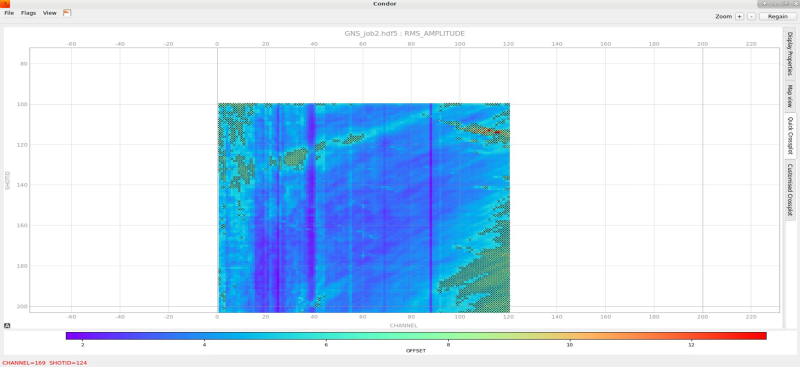
2D marine tutorial line kill test mode
The new RAPTOR application released in V2023.1.1 is designed to analyse uncorrected CDP gathers and generate a dense NMO velocity field that can produce the best stack.
The initial parameter form displays a map of the line or survey you are going to run Raptor on and provides access to the initial parameters for the application.
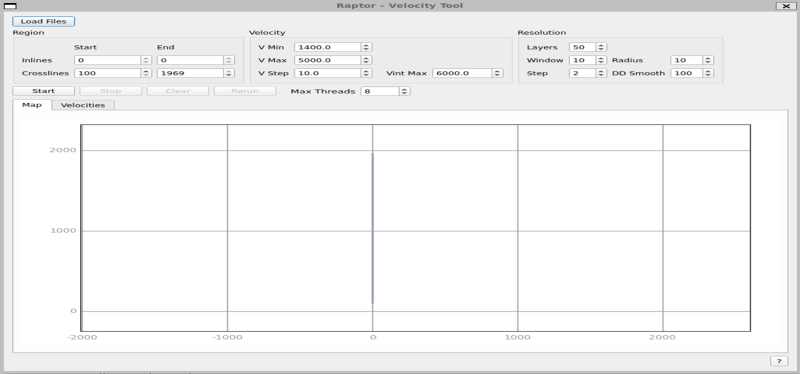
Raptor initial start-up and parameter form
When the application starts you can click on the Velocities tab and view a QC display of the velocity field as it develops, user can choose to display an inline/crossline or time slice Iso-velocity contour map. As the process runs this display will be data pre-smoothing so may look quite jittery after the entire volume is picked the smoothing operators will be applied.
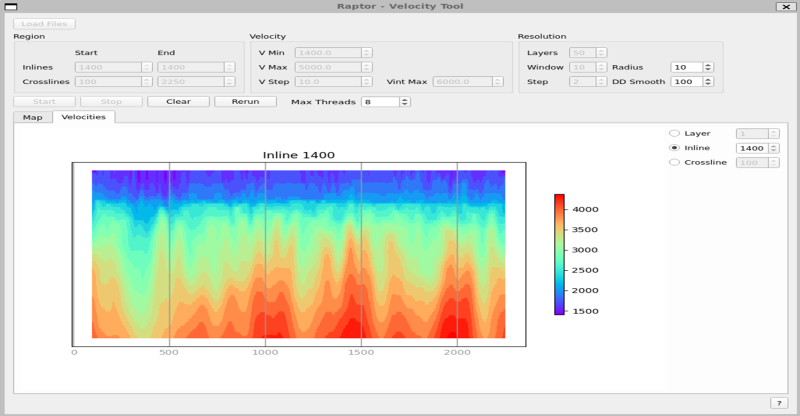
Raptor – QC display of output velocity field
Price: 0 $
Price Currency: $
Operating System: Windows
Application Category: Oil & Gas Engineering
Latest update
License Price
OS








Reviews
There are no reviews yet.