

Latest update
License Price
OS
iMobie DroidKit is the most comprehensive all-in-one Android device management and recovery solution available—offering a complete toolkit that addresses virtually every Android problem users may encounter. Unlike specialized tools that solve only one type of issue, DroidKit combines eight powerful utilities into a single, user-friendly interface: Screen Unlocker, FRP Bypass, Data Recovery (Quick & Deep), Data Extractor for crashed devices, System Fix, Data Manager, System Reinstall/Upgrade, and System Cleaner.
Version 2.3.7.20260212 continues iMobie’s mission of making Android repair and data management accessible to everyone—requiring no technical knowledge, no rooting, and no costly trips to repair shops. With industry-leading success rates and support for virtually every Android version and device model, DroidKit can transform a locked, crashed, or malfunctioning phone back into a fully working device in minutes.
This comprehensive Android toolkit is designed for:
Smartphone Users & Consumers needing to unlock forgotten screen locks, bypass FRP, or recover lost data.
IT Support Professionals & Technicians repairing and managing Android devices for clients or organizations.
Second-Hand Phone Dealers preparing devices by removing FRP locks and restoring factory settings.
Anyone Experiencing Android Issues including system crashes, black screens, frozen devices, or data loss.
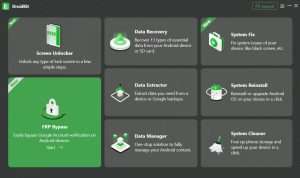
Remove Any Screen Lock Instantly:
Bypass PIN, password, pattern, fingerprint, and face recognition
Compatible with Samsung, LG, Motorola, Google Pixel, and most Android brands
No rooting required
Works even when phone is locked or disabled
Remove Factory Reset Protection:
Instantly bypass Google FRP lock after factory reset
Essential for second-hand phones or devices locked to previous Google account
Compatible with all Android versions and major manufacturers
No technical skills required
Quick Recovery:
Scan device memory for recoverable data without root
Recover up to 13 data types including:
Photos and videos
WhatsApp messages and attachments
Text messages (SMS)
Contacts and call logs
Documents and files
Deep Recovery:
Comprehensive scan of all memory sectors
Find deleted data not yet overwritten
NO-DATA-LOSS technology for maximum success rates
Recover from internal storage and SD cards
Extract Data from Dead or Damaged Phones:
Access data from devices with cracked screens, black screens, or system crashes
Extract data from Samsung devices with corrupted operating systems
Transfer recovered data to new Android phone or computer
No technical expertise required
Repair Android System Issues:
Fix black screen, boot loop, frozen screen
Resolve app crashes and camera failures
Repair unresponsive touchscreen
No data loss during repair
Compatible with all Android versions
Complete Android File Management:
Preview and manage all device content from computer
Transfer photos, videos, music, and contacts
Add files to device for offline enjoyment
Backup personal data before repairs
Intuitive drag-and-drop interface
Install or Upgrade Android OS:
Reinstall current Android version or upgrade to newer OS
Automatically match official, secure ROM to your device
One-click installation—no manual searching
No rooting required
No virus or malware risk
Free Up Device Storage:
One-click cleanup of cache files
Identify and remove background apps
Delete APK files and large files
Free space for new photos and apps
Improve device speed and performance
Retrieve Data from Google Backup:
Scan and preview Google backups
Recover WhatsApp backups
Access Google Photos, Contacts, Calendar
Selectively recover what you need—no full restore required
Recover Data from SD Cards:
Retrieve photos, videos, and files from accidentally formatted cards
Support for SD cards that were deleted or completely formatted
Currently available for Windows (Mac support coming soon)
OS: Windows 11, 10, 8, 7, Vista (32-bit & 64-bit)
CPU: Pentium IV 2.4 GHz or higher
RAM: 512 MB minimum
Storage: 100 MB free space
Display: 1024 × 768 resolution or higher
Graphics: Accelerated 3D graphics card with 64 MB RAM
Other: USB driver and ADB device driver
Price: 125 $
Price Currency: $
Operating System: Windows
Application Category: HVAC
Latest update
License Price
OS









Reviews
There are no reviews yet.