

Latest update
License Price
OS
Keysight Visual-Environment is a powerful graphical test and measurement software platform that revolutionizes how engineers create, manage, and automate instrument control and data acquisition workflows. Unlike traditional programming-intensive approaches, Visual-Environment provides an intuitive visual development environment where engineers can design complex automated test systems using drag-and-drop functional blocks—dramatically reducing development time while increasing reliability and repeatability. Version 24.0 delivers enhanced performance, improved usability, and expanded support for modern mixed-signal instruments and industry-standard communication protocols. Whether developing test systems for R&D characterization, production validation, or quality assurance, Visual-Environment empowers engineers to focus on measurement results rather than programming syntax.
This professional test automation software is designed for:
Test Engineers & Validation Specialists developing automated test systems for electronic devices and components.
R&D Engineers & Researchers performing complex measurements and data analysis in laboratory environments.
Production Test Engineers implementing high-volume automated test solutions for manufacturing.
RF & Microwave Engineers characterizing components and systems with precision instrumentation.
Semiconductor & Electronics Engineers validating ICs, PCBs, and electronic systems.
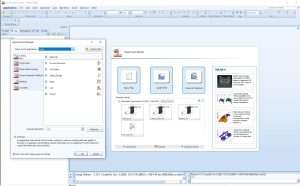
Visual Workflow Design:
Drag-and-drop test sequence creation
Function block-based architecture
Flowchart-style test development
Interactive measurement logic editing
No traditional coding required for most applications
Intuitive Environment:
Modern graphical user interface
Streamlined configuration process
Minimal learning curve
Accessible to engineers and technicians
Comprehensive Instrument Support:
Direct integration with Keysight instruments
Oscilloscopes, signal generators, spectrum analyzers
Power supplies, multimeters, network analyzers
Mixed-signal and RF test equipment
Multi-Instrument Synchronization:
Simultaneous control of multiple instruments
Coordinated measurements across devices
Precise timing and triggering
Automated instrument discovery and configuration
Test Procedure Creation:
Build fully automated test routines
Sequential and parallel execution support
Conditional logic and branching workflows
Loop control and iteration capabilities
Event-driven and trigger-based execution
Production Test Ready:
High-volume test automation
Regression test capabilities
Quality assurance workflows
Repeatable and reliable execution
High-Speed Capture:
Real-time data streaming from connected instruments
Continuous and triggered acquisition modes
Analog and digital signal capture
Multi-channel acquisition capabilities
Precise time stamping and synchronization
Signal Processing:
Built-in signal processing functions
Mathematical operations and transforms
Filtering, scaling, and normalization
Statistical analysis tools
Measurement calculation modules
Real-Time Display:
Live waveform visualization
Custom dashboards and display panels
Charts, graphs, and plots
System performance monitoring
Interactive result exploration
Result Presentation:
Professional report generation
Export to standard formats
Graphical result documentation
Test summary creation
Analog & Digital Integration:
Combined analog and digital signal testing
Mixed-signal system validation
Multi-domain measurements
Cross-instrument data correlation
High-precision signal analysis
Complex Signal Analysis:
Advanced waveform measurements
Modulation analysis
Eye diagram generation
Jitter and noise characterization
Communication Protocol Support:
USB, LAN, GPIB, Serial interfaces
Industry-standard connectivity
Reliable hardware communication
Driver-based instrument integration
System Integration:
Seamless external hardware connection
Multi-vendor instrument support
Scalable system architecture
Modular test system design
Automated Logging:
Real-time data recording
Structured data storage
Export to standard file formats
Historical data analysis
Traceable test records
Reporting:
Customizable report generation
Automated documentation
Test summary creation
Results archiving
Fully Automated Execution:
Scheduled test runs
Batch testing support
Automated reporting and logging
Reduced manual intervention
Performance Optimization:
Improved execution speed
Enhanced data handling
Optimized resource utilization
Streamlined workflows
Workflow Debugging Tools:
Test sequence validation
Error detection and reporting
Diagnostic logging
Troubleshooting support
Real-time monitoring
Enhanced Mixed-Signal Support – Improved capabilities for combined analog/digital testing
Performance Optimizations – Faster workflow execution with reduced latency
Expanded Instrument Library – Support for latest Keysight instruments
UI/UX Refinements – Modernized interface with improved workflow organization
Data Visualization Enhancements – New chart types and display options
Protocol Support Updates – Latest communication standards
Scripting Integration – Enhanced customization capabilities
Stability Improvements – Bug fixes and reliability enhancements
OS: Windows 10 or 11 (64-bit only)
Processor: Intel Core i5 or higher
RAM: 8 GB
Storage: 5 GB free disk space
Display: 1366 × 768 resolution
OS: Windows 11 (64-bit)
Processor: Intel Core i7 or equivalent
RAM: 16 GB or more
Storage: SSD with 10 GB+ free space
Display: 1920 × 1080 or higher resolution
Compatible Keysight instruments (optional but recommended)
USB, LAN, or GPIB interface ports as needed
Stable hardware communication environment
Instrument drivers and communication libraries
Administrator privileges for installation
Appropriate instrument connectivity software
Price: 125 $
Price Currency: $
Operating System: Windows
Application Category: Other
Latest update
License Price
OS









Reviews
There are no reviews yet.