MaxCut Business 2.9.6.4

Latest update

February 4, 2026

License Price

125 $

OS

Windows

MaxCut Business


MaxCut software is designed to produce accurate cutting plans and cost estimates for the woodworking, cabinetmaking and metalworking industries. It works very simply: the user enters the required dimensions and materials, and MaxCut does the rest. With just one click, the program can generate optimized cutting plans, cost estimates, purchase orders and necessary labels. This tool allows users to make their planning and production processes significantly faster, more efficient and more accurate, ultimately reducing raw material waste and saving time and money. With its intuitive user interface, the system quickly puts even new users on the path to effective use of the software’s features.
Program features and functions

  • Upon launching the software, the user is greeted with a very neat and polished user interface that quickly gets them up and running. A large portion of the screen is dedicated to the editing space, and the main functions are cleverly organized into tabs. From the very beginning, the user is guided through a series of steps to configure the default layout values, how objects are positioned on the sheet, and some other technical aspects. The program’s intuitive design quickly gets the user ready to make the initial settings and start the design and cutting process. This approach is particularly useful for saving time and reducing the learning curve.
  • To facilitate further work, the user can spend time setting up more details , such as company profiles, suppliers and customers, as well as configuring the objects and materials they work with. Contact details are easily completed by entering the relevant information. There is also the possibility of setting up currency details , so if the user is dealing with financial transactions, they only need to select work items from the lists they have created. This feature helps to manage inventory, pricing and business relationships information in a coherent and fast way .
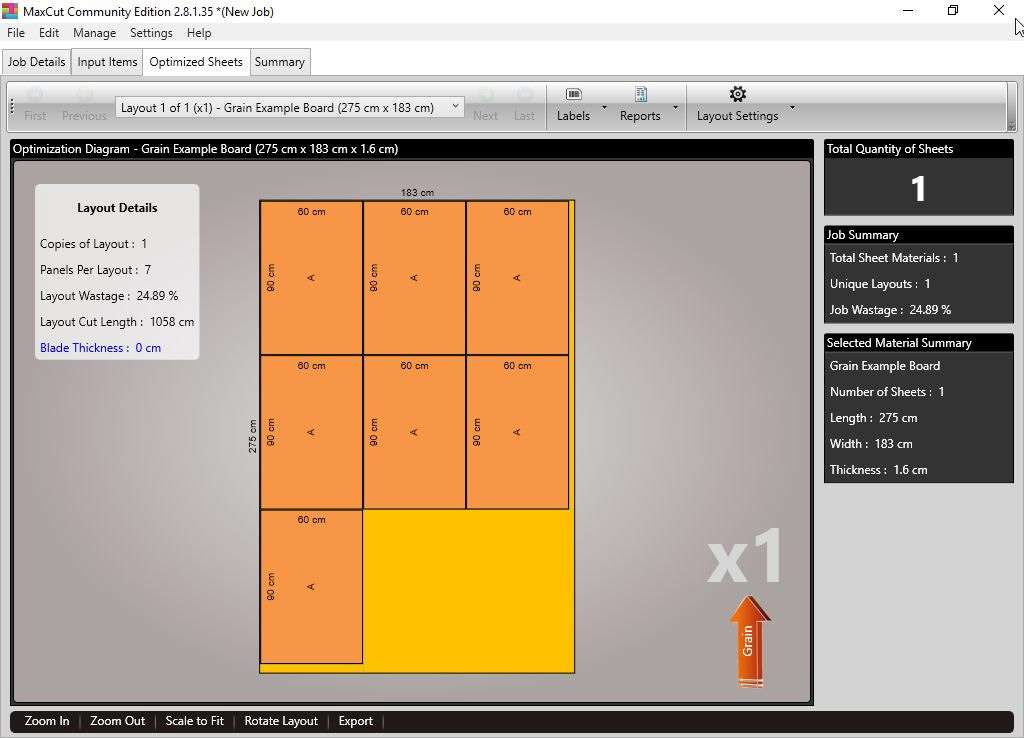
  • The Input Items tab can be populated with three types of inputs: sheets, edges, and hardware. The windows for creating these items are easy to understand and feature a real-time updating preview . This is very useful because the user works with numerical values ​​for dimensions and other details. All these items are displayed in a list along with their associated information. The user can sort them as desired and even run the optimization tool based on the settings they managed in the initial wizard. For a better preview, accessing the optimization tab visually displays a representation of the project in which the cutting patterns are highlighted and accompanied by dimensional specifications, materials, and other necessary details.
  • Almost all types of data that the user adds can be saved in file format for further processing. The software offers a degree of flexibility , as the user can directly print the plan or save lists in TXT, CSV or XLS . There is also the possibility of analyzing the financial impact , which displays a summary of pie charts with the amount and distribution of materials and items used. The total cost is also displayed with the currency symbol specified by the user.
Software

Price: 125 $

Price Currency: $

Operating System: Windows

Application Category: Manufacturing

Editor's Rating:
5

Latest update

February 4, 2026

License Price

125 $

OS

Windows

Reviews

There are no reviews yet.

Be the first to review “MaxCut Business 2.9.6.4”

Your email address will not be published. Required fields are marked *

Recommended for You