NCH Pixillion Image Converter Plus 12.30

Latest update

December 27, 2025

License Price

125 $

OS

Windows

NCH Pixillion Image Converter Plus 12.30


NCH ​​Pixillion Image Converter Plus is one of the fastest, most stable, easiest and most comprehensive multi-format image converters available. The simple one-click process makes Pixillion perfect for converting your image files and digital photos to be compatible with different devices, apps and online platforms.

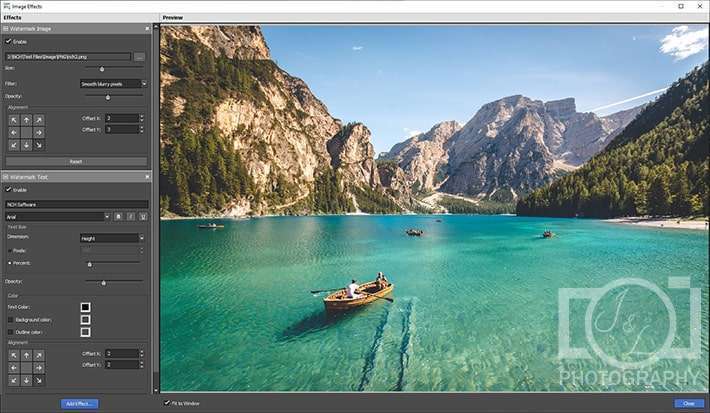
Batch convert or compress photos with ease. Preserve vector graphics when converting between vector formats. Resize images, add captions and watermarks, and even convert images from the right-click menu. Add text and image watermark on your converted images.

 

NCH Pixillion Image Converter


The preview area can help you visualize your final watermarked image. Apply and adjust the strength of filter effects on your images: black and white, brown, negative and auto levels. Easily make color adjustments, change brightness, increase contrast, and adjust exposure for a whole batch of images with just a few clicks. Save time by previewing changes in progress. Preview images before conversion, as well as image file format, compression settings and dimensions for image resizing. Quickly and easily change photos while converting file formats. Rotate photos, crop unwanted parts, reverse images and resize for perfect output.

Features and features of the CADS Design Suite program:

  • Convert images to JPEG, GIF, PNG, PDF, BMP, TIFF and more
  • Rotate, resize and compress digital photos
  • Add subtitles, watermarks or logos to your images
  • Easily update image file metadata.
Software

Price: 125 $

Price Currency: $

Operating System: Windows

Application Category: Graphics

Editor's Rating:
5

Latest update

December 27, 2025

License Price

125 $

OS

Windows

Reviews

There are no reviews yet.

Be the first to review “NCH Pixillion Image Converter Plus 12.30”

Your email address will not be published. Required fields are marked *

Recommended for You