

Latest update
License Price
OS
Nomad Sculpt 2.9.3 brings the acclaimed mobile sculpting experience to desktop platforms delivering professional-grade digital sculpting capabilities to Windows and macOS users without compromising on power or features. Originally renowned as the premier sculpting app for iPad and Android tablets, Nomad Sculpt has evolved into a cross-platform powerhouse that maintains the intuitive, touch-friendly workflow while optimizing for desktop input methods.
Version 2.9.3 combines the sophisticated sculpting engine supporting multi-million polygon counts with an advanced brush system, dynamic topology, comprehensive material options, and real-time PBR rendering—all within an accessible interface that doesn’t require weeks of training. For artists who prefer desktop workstations with traditional tablets and mice, or who want consistency between mobile and studio environments, Nomad Sculpt delivers professional results with remarkable performance and value.
nomad sculpt 2.9.3
This professional digital sculpting software for desktop is designed for:
Digital Artists & 3D Sculptors creating detailed organic and hard-surface models on Windows or macOS workstations.
Game Developers & Indie Studios producing character assets, props, and environment models with a streamlined, powerful tool.
3D Printing Enthusiasts preparing high-resolution, watertight models for additive manufacturing.
Concept Artists & Illustrators developing 3D concepts for characters, creatures, and objects with intuitive sculpting tools.
Hobbyists & Beginners learning digital sculpting with an accessible yet professional-grade application.
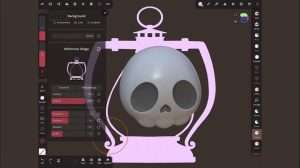
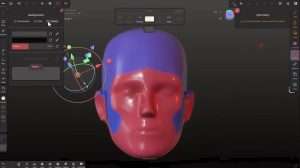
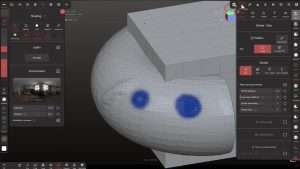
High-Resolution Sculpting:
Support for multi-million polygon meshes with smooth real-time performance
Multiple resolution levels for efficient workflow from blocking to fine detail
Dynamic tessellation for adaptive detail where needed
Optimized for modern multi-core desktop processors
Comprehensive Brush System:
Standard brushes: clay, smooth, move, inflate, crease, flatten, scrape, pinch, twist, grab
Advanced brushes: knife, trim, mask, paint, and custom brush creation
Fully adjustable brush properties (size, intensity, falloff, auto-masking, alpha textures)
Brush symmetry with mirroring across X, Y, and Z axes
Radial symmetry for complex repetitive patterns
Adaptive Mesh Resolution:
Automatic subdivision where detail is needed
Intelligent polygon distribution across model surface
Real-time topology updates while sculpting
Preserve sharp edges and features during subdivision
Retopology Tools:
Manual retopology with quad-drawing tools
Automatic retopology algorithms for clean mesh generation
UV mapping and unwrapping with multiple projection methods
Mesh decimation for polygon reduction when needed
Boolean Operations:
Union, difference, and intersection operations
Non-destructive boolean workflow with history
Combine multiple meshes into complex forms
Interactive boolean preview before commitment
Vertex Painting:
Paint directly on mesh vertices with intuitive brushes
Multiple paint layers with blending modes (normal, multiply, screen, overlay)
Color, roughness, metallic, ambient occlusion, and emissive channels
Stencil and projection painting for precise detail placement
Pressure sensitivity support for graphics tablets
Material System:
Full PBR (Physically Based Rendering) material support
Metalness/roughness workflow with customizable parameters
Extensive material library with professional presets
Create and save custom materials
Real-time material preview on sculpted forms
PBR Render Engine:
Physically-based rendering preview with accurate material response
Multiple lighting environments for different presentation needs
HDRI environment map support with rotation control
Adjustable exposure, contrast, and post-processing effects
Final Render Output:
High-resolution render exports up to 4K and beyond
Transparent background support for compositing
Multiple image formats (PNG, JPEG, TIFF, BMP)
Render passes for professional compositing workflows
Import Formats:
OBJ, STL, FBX, GLTF, GLB, 3DS, PLY, ABC
Import multiple objects with hierarchy preservation
Retain vertex colors and material assignments
Scene merging and appending capabilities
Export Formats:
OBJ, STL, FBX, GLTF, GLB, PLY, ABC
Export with complete material and texture data
Optimized STL export for 3D printing (watertight mesh guarantee)
Animation and rigging data preservation (FBX)
Scene file format for complete project state preservation
Input Flexibility:
Full support for graphics tablets with pressure sensitivity (Wacom, Huion, XP-Pen)
Traditional mouse and keyboard workflow
Customizable keyboard shortcuts for frequently used tools
Multi-monitor support for expanded workspace
UI Customization:
Adjustable interface scaling for different monitor resolutions
Customizable tool palettes and workspace layouts
Dark/Light theme options
Context-sensitive tool panels
Performance Optimization:
Hardware-accelerated viewport using modern GPU capabilities
Multi-threaded sculpting engine for smooth performance
Optimized memory management for large, complex scenes
Measurement & Scaling:
Precise dimension checking for 3D printing preparation
Unit scaling and conversion (mm, cm, m, inches)
Distance and angle measurement tools
Real-world scale verification
Masking & Selection:
Paint-based masking with brush controls
Geometric selection tools (lasso, rectangle, by material)
Invert, smooth, expand, and contract mask options
Hide/unhide selected geometry for focused sculpting
Scene Organization:
Multiple object support with hierarchy
Layer-based organization system
Object visibility and solo modes
Grouping and instancing capabilities
Local file storage with full file system access
Import/export compatibility with major 3D software (Blender, ZBrush, Maya, 3ds Max)
Alembic cache support for animation workflows
Scene file format (.nomad) for complete project preservation
Enhanced Brush Engine – Improved brush performance with new smoothing algorithms and better pressure response
New Sculpting Brushes – Additional specialized brushes for hard-surface detailing, fabric folds, and organic textures
Performance Optimizations – Faster viewport performance with reduced GPU overhead
Material Library Expansion – 50+ new PBR materials added across multiple categories
UI/UX Refinements – Streamlined interface with customizable tool organization and improved workspace layouts
Export Format Updates – Enhanced FBX export with better rigging data preservation and material binding
Boolean Tool Improvements – More stable non-destructive boolean operations with preview capabilities
Stability Enhancements – Comprehensive bug fixes and reliability improvements
Multi-threading Optimization – Better utilization of multi-core processors for smoother high-poly sculpting
Tablet Driver Support – Expanded compatibility with latest graphics tablet drivers
Price: 145 $
Price Currency: $
Operating System: Windows
Application Category: Other Specialties
Latest update
License Price
OS






Reviews
There are no reviews yet.