The perfect platform for exploring your best ideas
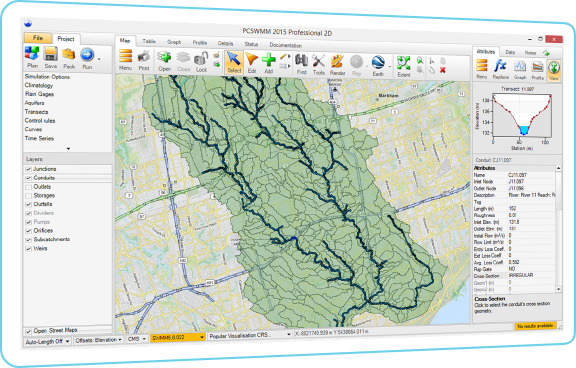
PCSWMM will help improve your new water supply, drainage and green infrastructure design, floodplain delineation, sewer overflow mitigation, water quality and integrated catchment analysis, 1D-2D modeling – and much, much more. Easy to learn, PCSWMM expands with you as your confidence grows.
Dramatically streamline your workflow
Save a ton of time with smart and easy-to-use tools designed by engineers who use the software every day. With a high performance, stand-alone GIS engine at its core, you can efficiently analyze systems, synthesize, develop and prove models and make informed decisions.
Benefit from flexible, open software
PCSWMM is built to accommodate your existing software ecosystem – and with its open standard data formats, sharing your work with clients and colleagues is effortless. PCSWMM’s open source engine is far from a black box, so you can confidently work with transparent and trusted code.
Say goodbye to limits
With no restrictions on model size and complexity, PCSWMM is optimized to handle millions of time series data points and hundreds of thousands of entities. No matter how large or small your model, you’ll make effective use of all your data at a fraction of the cost of comparable software.
User-friendly and highly supported
PCSWMM’s design is incredibly intuitive and easy to use, allowing you to quickly focus on the engineering. And with unparalleled free educational resources, such as JWMM and OpenSWMM, comprehensive integrated training, and unlimited technical support from qualified professional engineers, you’ll be a star.
Release Note
New SWMM engines
Improvements and optimizations
Bug fixes
Detail
Support SWMM 5.2.2, SWMM 5.2.3 and SWMM 5.2.4
Add street editor
Add inlet editor
Add inlet usage editor
Add None to the Normal Flow Criterion
Support Raingage, Variable and Expression in Control rule editor
Support Inlet object for Conduits
Support street cross-section type for Conduits
Add a new conduit property: inlet usage
Draw inlets and connectivity on the Conduits layer
Add “Show conduit inlets” option to the preferences dialog
A Type 5 variable speed pump
Support pre-defined shapes for Storage Units with the attributes MajorLength, MinorLength, SideSlope and Height
Support the Rain Barrel LID covered property
In Climatology – Temperature tab add more options for GHCN climate files
Table panel now supports
Street object table
Inlet and inlet usage table
Add “Covered” attribute to rain barrel table
Add the four new attributes to Storages table
Details panel changes to support new objects and attributes:
Compare default
Compare scenarios
Pull from other scenarios
SRTC changes to support new objects and attributes
Support the four new attributes of the Storage layer
Support Streets
Support Inlets
Support Inlet usages
Import support for new objects/attributes
Push changes support for new objects/attributes
Street flow summary table added to the status report
Perform model content compatibility check when switching to an earlier version of the SWMM engine
Improvements to Python Scripting:
Move Scripting Editor to a panel
Add JupyterLab support (launch via a button in the scripting panel) uses Python 3.10.10
Standardize scripting to Python version 3.10.10 (other versions can be specified via Environments editor)
Install Python 3.10.10 with PCSWMM along with the following common Python libraries:
jupyterlab==3.6.3
numpy==1.24.2
scipy==1.10.1
matplotlib==3.7.1
sympy==1.11.1
pandas==1.5.3
shapely==2.0.1
requests==2.28.2
openai==0.27.2
openpyxl==3.1.2
ipywidgets==8.0.5
ipydatagrid==1.1.15
ipyleaflet==0.17.2
geojson==3.0.1
ipympl==0.9.3
textwrap3==0.9.2
geopy==2.3.0
lxml==4.9.2
black==23.1.0
jupyterlab-language-pack-zh-CN==3.6.post1
jupyterlab-language-pack-fr-FR==3.6.post1
jupyterlab-language-pack-es-ES==3.6.post1
voila==0.4.0
plotly==5.14.1
ipyflex==0.2.6
numba==0.57.1
Add an option to the Create Installer tool to encrypt scripts to a .pyb file (protects critical scripts from being changed and the code from being viewed)
Add Script File Properties dialog for setting script tags, etc.
Add “Clear Startup” and “Close All” menu item to the Scripting panel
Support adding a WebView2 browser to pyForm for more advanced JavaScript support
Add PyForm.add_webview2()
Support adding tab control to PyForm
Add PyForm.add_tab_control() to return PyTabControl type
Add PyTabControl.add_page() to return PyTabPage type
Change PyLayer.get_entities() so that “Touches” works the same as the Select by location tool
Add PyGeometry.smooth() to support smoothing line entities
Add PyLayer.CategoryOrder[] to support ordering attribute category
Add support for in-memory layer in PyGIS.add_layer()
Add PyAttribute.Readonly to support results attribute
Add pcpy.PCSWMMFolder to retrieve the folder PCSWMM was installed to
Support icon button: add_icon_button(image_name)
Support placeholder in PyAttribute.Units
Support for opening and returning data from a raster layer
Add pcpy.Map.RasterLayers – return a dictionary of raster layers (key = layer name, value = PyRasterLayer object)
Add pcpy.Map.RasterLayer – get a raster layer by name, PyRasterLayer object
Add pcpy.Map.open_layer (layer_name) – return a PyRasterLayer object










Reviews
There are no reviews yet.