

Latest update
License Price
OS
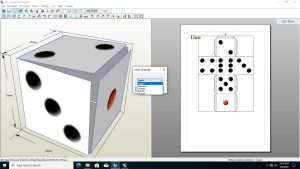
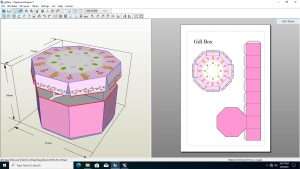
Pepakura Designer 6.1.6, developed by Tamasoft, is the world’s most popular software for transforming 3D digital models into physical paper crafts. Originally developed in Japan, Pepakura (a portmanteau of “paper” and “craft”) has gained a global following among cosplayers, hobbyists, and creators who want to bring their favorite characters, vehicles, and designs into the real world without expensive 3D printing equipment.
The software’s core function is “unfolding”—taking a complex 3D model and mathematically flattening it into a 2D pattern of connected pieces that can be printed on standard paper or cardstock, then cut, folded, and assembled back into the original 3D form. Version 6.1.6 continues Pepakura’s tradition of accessibility and precision, offering powerful unfolding algorithms alongside intuitive customization tools that make paper crafting accessible to beginners while offering the depth experienced builders demand.
This specialized paper craft software is designed for:
Cosplayers & Costume Makers creating lightweight, detailed armor, helmets, and props from paper or cardstock.
Hobbyists & Model Enthusiasts building physical replicas of characters, vehicles, and structures from games, movies, and anime.
Artists & Designers prototyping concepts and creating physical maquettes without expensive 3D printing.
Educators & Students teaching spatial reasoning, geometry, and design through hands-on model building.
Game Developers & Digital Artists bringing digital creations into the physical world for promotion or portfolio.
Core Unfolding Engine:
Automatically unfolds 3D models into 2D patterns
Intelligent edge detection for optimal folding lines
Minimizes number of separate pieces while maintaining foldability
Preserves model topology and surface continuity
Unfolding Controls:
Adjustable unfolding parameters for complex geometries
Manual override for problem areas
Real-time preview of unfolded result
Undo/redo for iterative refinement
Import Formats:
OBJ – Wavefront OBJ (most common format)
STL – Stereolithography (3D printing standard)
3DS – 3D Studio Max
DXF – Drawing Exchange Format
LWO – LightWave 3D
MQO – Metasequoia (popular Japanese modeling tool)
Compatible 3D Software:
Blender
Autodesk 3ds Max
Autodesk Maya
SketchUp
ZBrush
Metasequoia
And any software exporting OBJ/STL/3DS
Pattern Arrangement:
Automatic optimal layout on paper
Manual repositioning of pieces
Rotation and mirroring of parts
Grouping and separation of components
Line Customization:
Adjustable line thickness for cutting/folding
Mountain vs. valley fold indicators
Tab and glue flap configuration
Numbering and labeling systems
Paper Optimization:
Fit patterns to standard paper sizes (A4, Letter, A3)
Minimize paper waste through intelligent layout
Multiple page support for large models
Print preview with page arrangement
Import and preserve original 3D model textures
Color mapping for visual reference during assembly
Optional grayscale printing for manual painting
Texture preview in 3D view
Precise Scaling:
Scale models to any desired size
Maintain proportion accuracy
Scale by percentage or absolute dimensions
Real-time dimensional feedback
Application Examples:
Cosplay helmets sized to fit head measurements
Models scaled for display cases
Miniature versions for desk display
Large-scale installations
3D Reference Viewer:
Pepakura Viewer included free
Rotate and zoom 3D model during assembly
Highlight corresponding parts in 3D view
Step-by-step assembly guidance
Instruction Features:
Part numbering system
Glue tab indicators
Fold direction markings
Assembly sequence suggestions
Paper Types:
Standard copy paper (for lightweight models)
Cardstock (60-110 lb / 160-300 gsm) for durable builds
Photo paper for glossy finishes
Adhesive paper for sticker applications
Print Settings:
Borderless printing option
Registration marks for multi-page models
Test print for scale verification
Printer calibration tools
Free to distribute and use
View 3D models and unfolded patterns
Rotate, pan, and zoom in 3D space
Highlight parts for assembly reference
No editing capabilities—ideal for sharing patterns
Price: 125 $
Price Currency: $
Operating System: Windows
Application Category: Printing
Latest update
License Price
OS










Reviews
There are no reviews yet.