

Latest update
License Price
OS
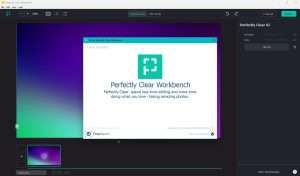
Perfectly Clear WorkBench is a professional-grade photo enhancement application developed by EyeQ that revolutionizes image correction through advanced AI algorithms and patented technologies. Unlike traditional editing software that requires manual adjustments for each image, Perfectly Clear automatically analyzes and corrects photos to replicate how the human eye naturally perceives scenes—delivering images that look clear, vibrant, and perfectly balanced with minimal user intervention. Version 5.0.2.3107 combines powerful automatic corrections with sophisticated AI-powered enhancements including sky improvement, skin tone optimization, and facial retouching, while maintaining complete manual control for fine-tuning when needed. For photographers, businesses, and anyone processing large volumes of images, Perfectly Clear delivers professional-quality results with unprecedented speed and consistency.
This professional AI-powered photo enhancement software is designed for:
Professional Photographers (portrait, wedding, event) needing fast, consistent, high-quality image correction.
Photo Labs & Print Shops processing thousands of images with uniform quality and professional results.
Real Estate Photographers enhancing property images to make spaces more appealing and accurate.
E-commerce & Product Photographers batch-processing product catalogs with consistent color and clarity.
Studio & Volume Photography Operations requiring efficient workflows for high-volume image production.
Intelligent Image Analysis:
Automatically detects and corrects common image issues
Evaluates exposure, color accuracy, contrast, sharpness, and noise
Mimics human visual perception for natural-looking results
Applies corrections based on image content and context
Core Corrections:
Exposure adjustment for properly lit images
Color accuracy and white balance correction
Contrast enhancement for visual impact
Noise reduction while preserving detail
Sharpening optimized for each image
Sky Enhancement:
Automatically detects sky in landscape and outdoor images
Enhances blue tones and cloud definition
Adds depth and drama to skylines
Natural-looking results without over-processing
Scene-Aware Adjustments:
Recognizes different types of scenes (portrait, landscape, product)
Applies scene-appropriate corrections
Optimizes settings based on image content
Consistent results across diverse image sets
AI-Powered Portrait Enhancement:
Automatic skin smoothing that preserves texture
Blemish and spot removal
Teeth whitening for brighter smiles
Eye brightening and enhancement
Red-eye correction
Advanced Portrait Tools:
Face contouring and slimming options
Under-eye dark circle reduction
Skin tone optimization for natural appearance
Makeup enhancement without artificial look
Batch Portrait Processing:
Apply consistent portrait enhancements to entire shoots
Perfect for wedding and event photographers
Studio workflow optimization
Time savings without quality compromise
High-Volume Workflow:
Apply corrections to hundreds or thousands of images simultaneously
Consistent results across entire image sets
Dramatically reduce processing time
Perfect for labs, studios, and e-commerce
Automated Workflow:
Set correction parameters once
Process entire folders automatically
Export in multiple formats
Integration with existing workflows
Precision Adjustments:
Full manual override for all automatic corrections
Sliders for exposure, contrast, highlights, shadows
Vibrance and saturation control
Temperature and tint adjustment
Sharpening and noise reduction fine-tuning
Customization:
Create and save custom presets
Adjust correction intensity per parameter
Fine-tune AI decisions when needed
Blend automatic and manual approaches
Pre-Built Presets:
Extensive library of professional presets
Presets for different photography genres
Starting points for various image types
One-click application of complex corrections
Custom Presets:
Save your own correction combinations
Maintain consistent style across projects
Share presets with team members
Build a personalized correction library
Process RAW files from major camera manufacturers
Maintain maximum image quality
Non-destructive editing workflow
Preserve all original image data
Export to multiple formats
Adobe Photoshop Compatibility:
Seamless plugin integration with Photoshop CS6+
Works with Photoshop Creative Cloud
Use Perfectly Clear within existing Photoshop workflow
Apply corrections non-destructively as Smart Filters
Adobe Lightroom Support:
Plugin for Lightroom 4+ including v6 and CC
Seamless round-trip workflow
Apply Perfectly Clear corrections within Lightroom
Maintain catalog organization
Additional Host Support:
Photoshop Elements 13, 14, 15
Corel PaintShop Pro X6, X7, X8, X9
Extend functionality of existing software
WorkBench:
Desktop application for previewing and testing corrections
Ideal for developers working with Perfectly Clear SDK
Experiment with correction parameters
Complete Edition:
Most feature-rich version for professional photographers
Includes all automatic corrections and manual tools
Facial retouching and beautification features
Essentials:
Simplified version with basic corrections
Perfect for enthusiasts and beginners
Streamlined interface
QuickDesk:
Designed for high-volume studio processing
Focus on speed and batch efficiency
Optimized for production environments
Enhanced AI Portrait Tools – Improved skin tone detection and natural-looking enhancements
Sky Enhancement Updates – Better sky detection with more natural color rendering
Batch Processing Optimizations – Faster processing for large image sets
New Preset Library – Additional professional presets for various photography genres
UI/UX Refinements – Streamlined interface with improved workflow
RAW Format Updates – Support for latest camera RAW formats
Performance Optimizations – Faster rendering and preview generation
Plugin Compatibility Updates – Enhanced integration with latest Adobe releases
Stability Improvements – Bug fixes and reliability enhancements
OS: Windows 11, Windows 10, Windows 8.1, Windows 7 (64-bit only)
RAM: 4 GB or more (8 GB+ recommended)
Graphics: OpenGL v2.0 or newer
Storage: 500 MB free space
Display: 1024 × 768 resolution or higher
OS: macOS 10.10 or later
RAM: 4 GB or more (8 GB+ recommended)
Graphics: OpenGL v2.0 or newer
Storage: 500 MB free space
Display: 1024 × 768 resolution or higher
Photoshop: CS6 or Creative Cloud (all recent versions)
Photoshop Elements: 13, 14, 15
Lightroom: 4 or newer (including v6 and CC)
Corel PaintShop Pro: X6, X7, X8, X9
Price: 125 $
Price Currency: $
Operating System: Windows
Application Category: Graphics
Latest update
License Price
OS







Reviews
There are no reviews yet.