

Latest update
License Price
OS
Graitec Advance PowerPack for Advance Steel is a comprehensive productivity enhancement suite that extends Autodesk Advance Steel far beyond its native capabilities—delivering specialized tools for steel connection design, fabrication detailing, and CNC output optimization. Developed by Graitec, a global leader in BIM and structural engineering software, PowerPack transforms Advance Steel from a capable steel modeling tool into a complete production platform for steel detailers and fabricators.
Version 2026.1 introduces an expanded Connection Vault with hundreds of parametric steel connections, advanced plate, bolt, and weld automation, sophisticated stair and railing macros, comprehensive drawing management tools, and enhanced NC/CAM output customization. For steel professionals who need to produce accurate, fabricator-ready models efficiently, Advance PowerPack delivers the specialized tools that make the difference between adequate and exceptional steel detailing.
This professional steel detailing toolkit is designed for:
Steel Detailers & Fabricators creating detailed connection designs, fabrication drawings, and CNC output for steel structures.
Structural Steel Engineers designing and detailing complex steel connections beyond standard library capabilities.
Steel Fabrication Shops preparing production-ready models with optimized NC/CNC output for manufacturing.
Construction Managers & Project Coordinators ensuring accurate steel detailing for on-site assembly.
BIM Managers coordinating steel models with architectural and MEP disciplines in integrated project delivery.
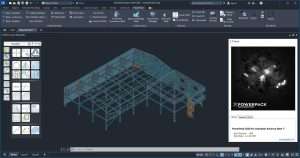
Expanded Connection Library:
Hundreds of parametric steel connections beyond Advance Steel’s default library
Connections for every major steel section type (I-beams, channels, angles, hollow sections, T-sections)
Moment connections, shear connections, bracing connections, and base plates
Column splices, beam-to-beam connections, truss connections
Specialized connections for seismic and high-load applications
Parametric Connection Design:
Fully parametric connections that automatically adjust to member sizes
Intelligent connection behavior that updates with model changes
Connection rules and preferences for consistent detailing
Connection design based on engineering principles
Connection Management:
Connection vault organization and searching
Favorite connections for quick access
Connection property editing and customization
Save custom connections to user libraries
Automated Plate Creation:
Intelligent gusset, end plate, and base plate generation
Stiffener and doubler plate automation
Connection plate sizing based on member dimensions
Plate notching and coping automation
Bolt Configuration:
Automatic bolt pattern generation for connections
Multiple bolt types and standards (ANSI, ISO, DIN)
Bolt group sizing and spacing optimization
Bolt hole and counterbore options
Weld Automation:
Automatic weld sizing based on connection type
Weld symbol generation and placement
Weld length and throat thickness calculation
Weld callout and annotation automation
Stair Macros:
Rapid creation of complex stair geometries
Multiple stair types (straight, L-shaped, U-shaped, spiral)
Automatic stringer, tread, and riser generation
Landing and intermediate platform automation
Railing Systems:
Comprehensive railing and handrail macros
Guardrail, stair rail, and platform rail options
Custom post spacing and baluster patterns
End treatment and corner condition automation
Customizable Geometry:
User-defined parameters for all components
Design options for different project requirements
Automatic compliance with building codes
Integration with steel framing model
General Arrangement (GA) Drawings:
Automated GA drawing generation from model
View creation with automatic scale and positioning
Dimension and annotation automation
Sheet layout optimization
Fabrication Drawings:
Single-part and assembly drawing generation
Automatic dimensioning and labeling
Section and detail view creation
Material and part lists on drawings
Bill of Materials (BOM):
Comprehensive material take-offs
Sort and organize by part type, size, material
Export to Excel, CSV, or other formats
Integration with estimation and procurement
CNC Output:
Support for multiple machine formats (DSTV, NC, DXF)
Machine-specific output configuration
Optimized nesting for material efficiency
Toolpath optimization for fabrication
Customizable Output:
Configurable numbering and labeling
Custom data fields for fabrication
Output templates for different machines
Batch output for multiple parts
Fabrication Integration:
Direct connection to CNC machines
Quality control and verification outputs
Material tracking and reporting
Production planning integration
Cold-Formed Steel Profiles:
Purlin and girt libraries (C, Z, Sigma sections)
Metal decking and cladding rails
Light-gauge framing members
International profile standards
Additional Sections:
Expanded hot-rolled section libraries
Hollow sections (circular, square, rectangular)
Custom profile creation and import
Profile property validation
Connection Copy Tools:
Intelligent connection copying between similar members
Copy connections across multiple levels and bays
Mirror and rotate connections as needed
Maintain connection integrity during copying
Batch Editing:
Edit multiple connections simultaneously
Global parameter updates
Connection property propagation
Model-wide consistency enforcement
Model Navigation:
Rapid selection and isolation tools
Connection browser and viewer
Model walkthrough and review modes
Clash detection integration
Native Advance Steel Interface:
Tools appear as additional ribbon tabs
Consistent with Advance Steel UI conventions
No need to leave design environment
Intuitive tool organization
BIM Workflow Compatibility:
IFC import/export optimization
CIS/2 and NC format support
Coordination with Revit and other BIM tools
Data exchange with analysis software
Expanded Connection Vault – Hundreds of new parametric steel connections added
Enhanced Stair Macros – More complex stair geometries with improved automation
Railing System Updates – Additional railing types and configuration options
NC Output Enhancements – Support for latest CNC machine formats
Cold-Formed Steel Library – Expanded purlin, girt, and cladding rail profiles
Performance Optimizations – Faster connection generation and model updates
Batch Editing Improvements – More powerful global editing capabilities
Advance Steel 2026 Compatibility – Full support for latest Autodesk release
UI/UX Refinements – Streamlined tool organization and access
CPU: Intel Core i5 or i7 latest generation processor
RAM: 16 GB (more may be required for large/complex projects)
Storage: SSD with 50 GB free space or more
Display: 22″ monitor or higher with 1920 × 1080 resolution
Graphics: DirectX 12 or higher and OpenGL 3.0 compliant graphics card
OS: Windows 10/11 64-bit
Price: 125 $
Price Currency: $
Operating System: Windows
Application Category: Manufacturing
Latest update
License Price
OS


Reviews
There are no reviews yet.