

Latest update
License Price
OS
Graitec Advance PowerPack for Inventor brings Graitec’s renowned productivity enhancements to Autodesk Inventor, focusing specifically on manufacturing-oriented improvements for sheet metal design, design automation, and standardized component creation. While PowerPack’s most extensive features target Revit and Advance Steel, the Inventor edition delivers valuable tools for mechanical designers and fabricators who need to streamline repetitive tasks and maintain consistency across designs.
Version 2026.1 includes specialized sheet metal tools for creating standard features, design automation macros that accelerate common workflows, and expanded libraries of ready-to-use components conforming to regional standards. For mechanical professionals who want to work smarter, not harder, Advance PowerPack for Inventor provides the productivity boost that makes the difference between meeting deadlines and exceeding expectations.
This professional productivity toolkit is designed for:
Mechanical Designers & Engineers accelerating sheet metal design and parametric modeling workflows.
Manufacturing Engineers creating standardized components with automated design tools.
Sheet Metal Fabricators developing flat patterns, bend deductions, and production-ready models.
Product Designers leveraging pre-built component libraries for faster concept development.
BIM & Construction Manufacturing Specialists preparing fabricated components for building systems integration.
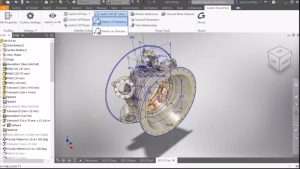
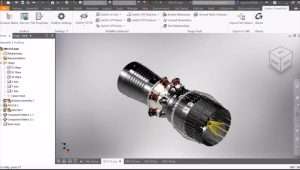
Standard Feature Creation:
Automated creation of common sheet metal features
Standardized corner treatments and reliefs
Consistent bend parameters across designs
Flange, hem, and lofted flange automation
Flat Pattern Optimization:
Enhanced flat pattern generation
Bend deduction and K-factor management
Nesting optimization for material efficiency
Export flat patterns to DXF/DWG for fabrication
Sheet Metal Macros:
Pre-configured macros for repetitive sheet metal operations
Customizable macro parameters
Batch processing for multiple parts
Time-saving shortcuts for common tasks
Workflow Accelerators:
Macros for repetitive design tasks
Automated feature creation sequences
Parametric design templates
Design variation generation
Standard Components Library:
Ready-to-use components conforming to regional standards
Mechanical fasteners, fittings, and hardware
Structural shapes and profiles
Industry-specific component libraries
Template-Based Design:
Pre-configured design templates
Standardized part families
Consistent parameter naming and organization
Design intent preservation
Intelligent Part Generation:
Create parts with embedded design rules
Automated feature placement based on parameters
Design validation and constraint checking
Design table management
Assembly Automation:
Automated component placement in assemblies
Standard connection patterns
Fastener pattern generation
Assembly constraint automation
Regional Standards Compliance:
Components conforming to international standards
Metric and imperial libraries
Industry-specific components (HVAC, structural, mechanical)
Regularly updated content
Custom Library Management:
Add user-defined components
Organize libraries by category and standard
Search and filter capabilities
Library sharing across teams
Production-Ready Output:
Generate manufacturing documentation
Export to common fabrication formats
Bill of Materials (BOM) generation
Integration with CAM workflows
Quality Assurance:
Design rule checking
Standard compliance verification
Error and warning identification
Design validation reports
Batch Operations:
Process multiple files simultaneously
Apply standard properties across designs
Batch export and conversion
Mass property updates
User Interface Enhancements:
Streamlined tool access
Customizable toolbars and ribbons
Workflow-optimized command organization
Keyboard shortcut support
Expanded Sheet Metal Macros – Additional automated operations for common sheet metal tasks
Enhanced Component Libraries – New components added based on regional standards
Design Automation Updates – Improved macros for faster workflow execution
Inventor 2026 Compatibility – Full support for latest Autodesk release
Performance Optimizations – Faster macro execution and library access
UI/UX Refinements – Streamlined tool organization and access
Batch Processing Improvements – More efficient multi-file operations
Stability Enhancements – Bug fixes and reliability improvements
CPU: Intel Core i5 or i7 latest generation processor
RAM: 16 GB (more may be required for large/complex assemblies)
Storage: SSD with 50 GB free space or more
Display: 22″ monitor or higher with 1920 × 1080 resolution
Graphics: DirectX 12 or higher and OpenGL 3.0 compliant graphics card
OS: Windows 10/11 64-bit
Price: 125 $
Price Currency: $
Operating System: Windows
Application Category: CAD
Latest update
License Price
OS



Reviews
There are no reviews yet.