

Latest update
License Price
OS
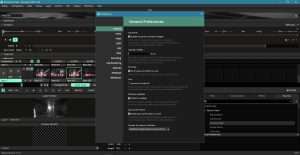
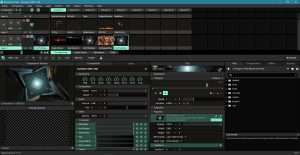
Resolume Arena is the ultimate all-in-one VJ software and video mixer, combining real-time video playback, effects processing, and advanced projection mapping capabilities in a single, powerful platform. Building on the core features of Resolume Avenue, Arena adds professional-grade tools for complex video installations, including advanced warping, edge blending, and DMX control. Version 7.24.2.62935 continues Resolume’s legacy of innovation with enhanced performance, expanded format support, and seamless integration with lighting consoles, media servers, and other AV equipment. Whether performing live visuals at a music festival, projecting onto architectural landmarks, or managing video walls at corporate events, Resolume Arena delivers the reliability, flexibility, and creative power that professional visualists demand.
This professional VJ and video mixing software is designed for:
VJs (Video Jockeys) & Visual Artists creating live visual performances for concerts, clubs, and festivals.
Event & AV Professionals managing video content for conferences, corporate events, and large-scale productions.
Projection Mapping Artists & Installers projecting visuals onto irregular surfaces and architectural structures.
Lighting Designers & Technicians integrating video with lighting systems via DMX/ArtNet.
Multimedia Performers & Theater Designers incorporating live video into theatrical and performance art productions.
Real-Time Video Playback:
Play multiple video clips simultaneously
Seamless looping and transitions
Support for virtually all video formats
Instant clip triggering and mixing
Layer-Based Mixing:
Unlimited video layers
Real-time compositing
Blend modes and opacity control
Masking and keying tools
Effects Engine:
Extensive library of real-time effects
FFGL plugin support for third-party effects
Audio-reactive effects via FFT analysis
Effects chaining and customization
Audio Integration:
Beat detection and sync
FFT analysis for reactive visuals
VST/AU plugin support for audio processing
Audio input monitoring
Advanced Warping:
Create multiple slices of your composition
Warp and distort video to fit irregular surfaces
Bezier transformations for curved screens
Free transform and perspective control
Multi-Surface Mapping:
Map video onto complex 3D objects
Architectural projection mapping
Stage design integration
Multiple projector setups
Edge Blending:
Seamless blending across multiple projectors
Adjustable blend curves and gamma
Create massive, unified displays
Perfect for video walls and multi-projector setups
DMX & ArtNet Control:
Control video parameters from lighting consoles
Map video parameters to DMX channels
Automated sequences and cues
Integration with grandMA, Hog, ChamSys, and more
NDI (Network Device Interface):
Stream video over IP network
Receive and send NDI streams
Networked video distribution
Seamless integration with broadcast workflows
Spout (Windows) & Syphon (macOS):
Share video between applications
Resolume as video source for other software
Real-time video routing
Creative cross-application workflows
SMPTE Timecode:
Synchronize visuals with timecoded audio
Perfect for theatrical productions
Multi-show consistency
Frame-accurate synchronization
Advanced Output Configuration:
Multiple independent outputs
Custom output resolutions
Screen splitting and arrangement
Output to multiple displays/projectors
Arena-Specific Tools:
Dedicated projection mapping workspace
Advanced output slicing
Real-time output monitoring
Preset configurations for quick setup
MIDI Control:
Map any parameter to MIDI controllers
Support for all MIDI devices
Custom control surface configuration
Hands-on performance control
Keyboard & OSC:
Keyboard shortcuts for quick triggering
OSC (Open Sound Control) support
Remote control via tablets/phones
Customizable control layouts
Generative Content:
Quartz Composer integration (macOS)
Flash animation support (AS2/AS3)
OpenGL custom content
Real-time generative visuals
Clip Management:
Extensive clip library organization
Thumbnail previews
Tags and categories
Fast search and filtering
Effect Chaining:
Build complex effect chains
Save and recall effect presets
Real-time parameter adjustment
Custom effect combinations
Real-time FFT analysis
Beat detection and sync
Audio-driven effects
Visualize music dynamically
Perfect for live performance
All major video formats
Image sequences
Still images (PNG, JPG, etc.)
Audio files
Alpha channel support
ProRes and other professional codecs
Enhanced Warping Tools – More precise bezier transformations for curved surfaces
NDI 5 Support – Improved network video streaming performance
DMX Mapping Enhancements – More flexible parameter control via lighting consoles
Performance Optimizations – Faster rendering and lower latency
New Effects – Additional FFGL plugins included
UI/UX Refinements – Streamlined workflow with improved tool organization
Format Support Updates – Latest video codec compatibility
Stability Improvements – Bug fixes and reliability enhancements
Multi-Touch Improvements – Better support for touch-screen control
OS: Windows 7 SP1 or later (64-bit only)
CPU: Intel Core i7 processor, 2.6 GHz
RAM: 4 GB
Storage: 5 GB free space
Display: 1024 × 768 pixels
Graphics: AMD or NVIDIA graphics card with 256 MB VRAM
OS: Windows 10/11 (64-bit)
CPU: Intel Core i9 / Xeon or AMD Ryzen 9 / Threadripper
RAM: 16 GB or more (32 GB+ for complex productions)
Storage: SSD with 50 GB+ free space
Graphics: Professional NVIDIA Quadro/GeForce RTX or AMD Radeon Pro with 4 GB+ VRAM
Display: 1920 × 1080 or higher (multiple displays recommended)
Audio: ASIO-compatible audio interface for low-latency audio
Price: 125 $
Price Currency: $
Operating System: Windows
Application Category: Video
Latest update
License Price
OS










Reviews
There are no reviews yet.