



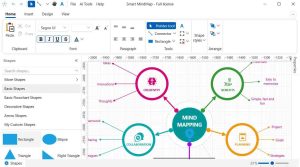










RFFlow 5.07 is a versatile diagramming software developed by RFF Electronics. It is designed to facilitate the creation of a wide spectrum of diagrams, including flowcharts, organizational charts, and network diagrams, serving professionals in business, education, and engineering sectors. Key capabilities include a drag-and-drop interface and extensive integration with common office suites.
RFFlow provides a comprehensive suite of tools for diagram creation, emphasizing ease of use and extensive customization. Its extensive shape library is a core feature, offering users a vast selection to build detailed visual representations. The software supports a user-friendly drag-and-drop interface, enabling efficient construction and modification of diagrams.
RFFlow is engineered for substantial compatibility with widely used office productivity suites. This integration allows for a smoother workflow, enabling users to incorporate visual data into their existing documents and presentations. The software supports common document formats, facilitating easy import and export operations.
The capabilities of RFFlow extend across multiple professional domains, offering practical solutions for data visualization and process documentation. Its user-friendly nature makes it accessible for a range of tasks, from simple flowchart creation to complex engineering process mapping.
RFFlow distinguishes itself in the diagramming software market primarily through its focus on user-friendliness and offline functionality. Unlike many cloud-based collaborative platforms, RFFlow offers a desktop application model suitable for individual users seeking local installation and a one-time purchase option. Its extensive shape library also provides a comprehensive set of visual elements directly within the application.
For individuals new to diagramming software, RFFlow offers an accessible entry point due to its intuitive design. The drag-and-drop interface and readily available shape library simplify the process of creating professional-looking diagrams. Familiarizing yourself with the extensive collection of shapes and the basic editing tools will enable efficient use for various diagramming tasks.
RFFlow allows users to create a variety of diagrams including flowcharts, organizational charts, network diagrams, and UML diagrams. The software supports a vast library of over 1600 shapes, enabling highly customizable diagramming capabilities.
RFFlow is designed to work seamlessly with Microsoft Office applications, allowing users to import and export diagrams to and from Word, Excel, and PowerPoint. Users can easily incorporate their diagrams into office documents without needing additional software.
RFFlow differs from tools like Lucidchart primarily in its desktop application model and extensive offline functionalities. While Lucidchart is cloud-based and offers collaborative capabilities, RFFlow is more focused on individual users who prefer local installations and a one-time purchase model.