

Latest update
License Price
OS
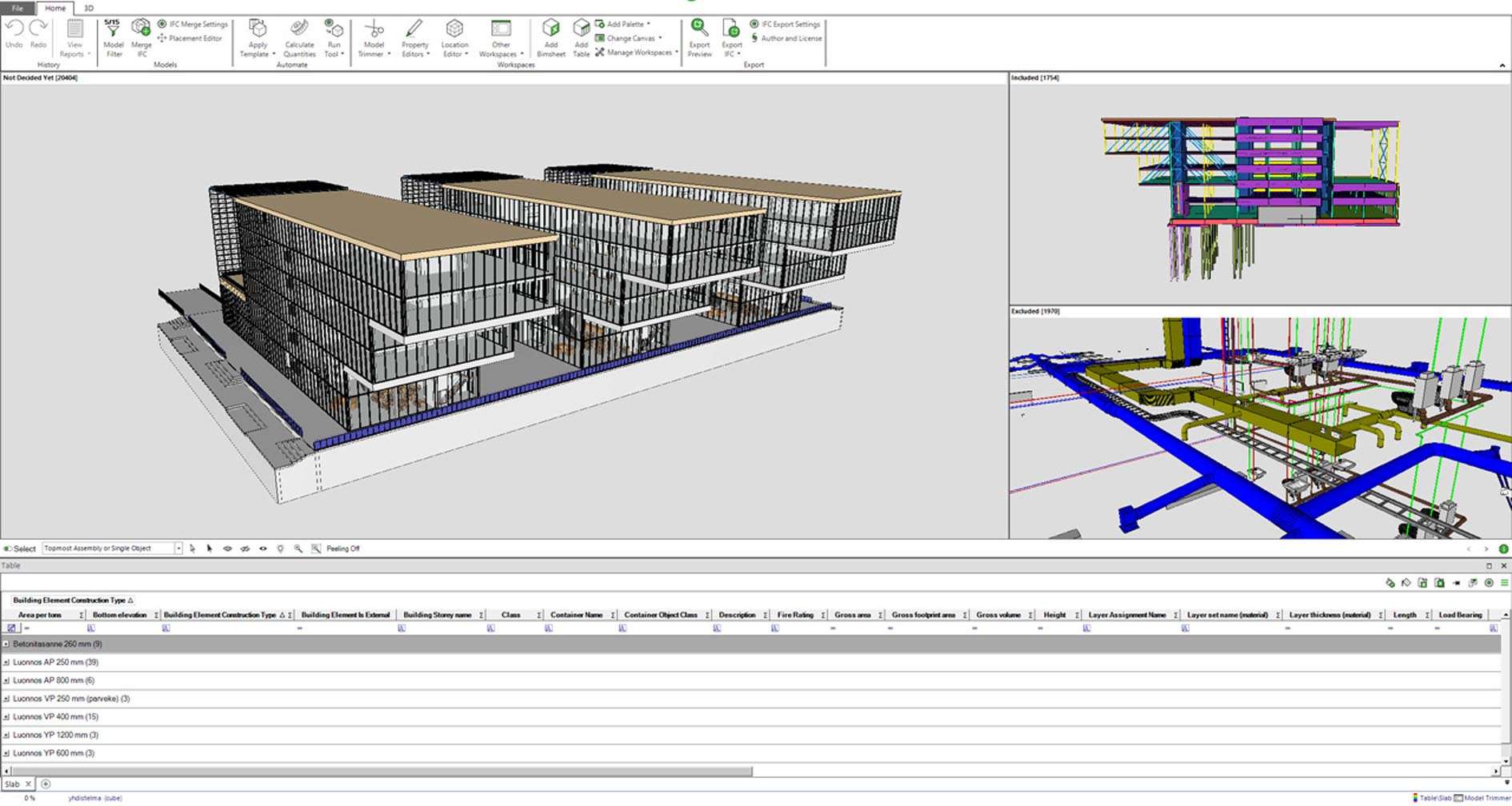
Simplebim is a specialized, powerful BIM data management application focused on the IFC (Industry Foundation Classes) open standard. It is not a modeling tool, but a “BIM spreadsheet” or data processor that allows users to open, view, analyze, edit, and export the rich information contained within IFC models. Its core strength is making the complex data in BIM models accessible, manageable, and useful for downstream processes like quantity takeoff, model validation, data delivery, and digital fabrication.
It empowers users to clean up messy models, add missing data, create custom classifications, and extract precisely the information they need without going back to the original authoring software.
Key Features & Capabilities
Simplebim treats an IFC model as a structured database, providing intuitive tools to work with it.
Core IFC Data Management & Visualization:
1. Non-Visual, Data-Centric Interface:
· Spreadsheet-like View: Presents all model objects (walls, doors, furniture) in a massive, filterable, and sortable table. Columns are IFC properties (dimensions, materials, costs, etc.).
· Graphical 3D View: A complementary 3D viewer to visualize selected objects, but the focus is on the data.
2. Powerful Data Editing & Enrichment:
· Bulk Editing: Change property values for thousands of objects at once using formulas, search-and-replace, or mapping from external data sources (Excel, CSV).
· Custom Properties & Classifications: Add new data fields (e.g., “Room Number,” “Supplier,” “Fire Rating”) or apply standardized classifications like Uniclass, OmniClass, or custom company standards.
· Model Validation & Rules: Create rules to check for data completeness, compliance (e.g., “All doors must have a fire rating”), and consistency. Automatically flag or fix errors.
3. Advanced Filtering & Selection:
· Visual & Data-Driven Selection: Select objects in the 3D view or by complex queries in the spreadsheet (“Select all walls in Level 2 with a thickness greater than 200mm”).
· Saved Selections & Views: Save complex filter criteria for reuse, perfect for generating recurring reports.
4. Reporting & Data Extraction:
· Flexible Reporting: Generate custom quantity takeoffs (QTO), component lists, and room data sheets directly to Excel or PDF. The user defines exactly which properties to include and how to group them.
· Export to Various Formats: Export filtered data or the entire enriched model to IFC, Excel, CSV, XML, or direct connections to other systems.
Key Workflows it Enables:
· BIM Validation & QA/QC: Check incoming models from consultants for compliance with the BIM Execution Plan (BEP).
· Data Enrichment for FM: Prepare as-built models for handover to facility management by adding asset IDs, warranty data, and maintenance schedules.
· Quantity Takeoff & Cost Estimation: Extract accurate, filtered quantities (volume, area, count) based on custom rules and classifications.
· Model Simplification for Collaboration: Create lightweight, view-only IFCs by removing unnecessary internal data or proprietary objects.
· Digital Fabrication Preparation: Extract precise geometric data and properties for manufacturing processes.
🖥️ System Requirements
Simplebim is a data-intensive application but is optimized for efficiency. The minimum system requirements are Windows 10 (64-bit) or macOS 10.15+, a modern 64-bit processor (Intel/AMD or Apple Silicon), 8 GB of RAM, 2 GB of free disk space, and a display with 1280×1024 resolution.
For recommended professional use when working with large, complex IFC models (e.g., full hospitals or airports), a system with Windows 10/11 Pro or macOS 12+, a fast multi-core processor, 16-32 GB of RAM, an SSD, and a high-resolution monitor is strongly advised to ensure smooth handling of massive datasets.
Price: 125 $
Price Currency: $
Operating System: Windows
Application Category: Architecture
Latest update
License Price
OS


Reviews
There are no reviews yet.