

Latest update
License Price
OS
SiNi Software Plugin for 3ds Max is a comprehensive collection of powerful productivity tools developed specifically to enhance workflow efficiency for Autodesk 3ds Max users. Built with performance in mind, SiNi delivers a robust suite of tools and scripts that simplify repetitive tasks, optimize scene organization, and dramatically improve the overall 3ds Max experience. Particularly invaluable for architectural visualization, game development, and VFX production, these plugins transform chaotic, heavy scenes into streamlined, manageable assets—saving hours of manual work daily. Unlike generic scripts, SiNi deeply integrates into 3ds Max’s architecture, providing reliable, production-tested solutions for studios and individual artists who demand efficiency without sacrificing quality.
This professional productivity toolkit is designed for:
Architectural Visualization Artists managing complex scene assets, proxies, and materials for client presentations.
Game Developers & Environment Artists preparing clean asset exports to Unity/Unreal with intact metadata.
VFX & Motion Graphics Artists handling large-scale scenes requiring efficient proxy conversion and scene optimization.
3D Modeling & Texturing Specialists streamlining repetitive tasks like batch renaming, material assignment, and UV validation.
Production Studios & Pipeline Supervisors standardizing 3ds Max workflows across teams with automation and scripting integration.

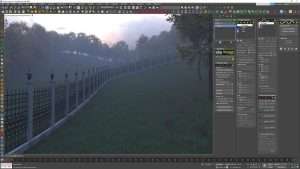
Intelligent Proxy Conversion: Instantly convert complex high-poly meshes to lightweight proxies for viewport performance optimization.
Batch Renaming Suite: Rename objects, materials, textures, and maps using flexible pattern-based rules and naming conventions.
Material Management Automation: Bulk assign, export, import, and purge materials to maintain clean, efficient material libraries.
Instance/Reference Management: Seamlessly convert between instances, references, and copies to optimize scene performance and file size.
Smart Weld & Cleanup: Detect and fix geometry issues including duplicate vertices, inverted normals, and open edges.
Custom Selection Sets: Create and manage complex selection sets based on object types, naming patterns, layers, or custom criteria.
Intelligent Filter System: Isolate objects instantly by material, texture, hierarchy level, or user-defined attributes.
Hierarchy Navigation Tools: Collapse, expand, and navigate complex scene hierarchies with specialized navigation controls.
UV Validation & Layout: Identify overlapping UVs, check UV distribution, and streamline the texturing process.
Automated Texture Assignment: Batch-assign textures based on naming conventions or object properties for large-scale texturing.
Texture Path Management: Fix broken texture paths and consolidate texture assets across projects.
Batch Export System: Simultaneously export multiple objects or entire scenes with customizable export presets.
FBX/OBJ Optimization Tools: Clean, rename, and optimize assets during export with metadata preservation.
Asset Sanitization: Remove unwanted scene data, hidden geometry, and redundant nodes during export pipelines.
Detailed Scene Statistics: Generate comprehensive reports on polygon counts, texture usage, material assignments, and memory consumption.
Error Detection Scanner: Identify missing textures, unassigned materials, invalid object names, and other common scene errors.
Asset Audit Trails: Track and document scene assets for quality control and pipeline compliance.
Polygon Reduction: Optimize specific objects while preserving visual fidelity—ideal for game-ready asset preparation.
Advanced Alignment Tools: Precision object positioning with enhanced snap and alignment controls.
Boolean & Mesh Repair: Clean up problematic geometry from CAD imports or complex boolean operations.
Customizable Toolbars: Seamlessly integrate SiNi tools into 3ds Max interface with user-defined button layouts and menu organization.
Macro & Script Recording: Automate repetitive workflows using SiNi’s API-compatible macro recording system.
Pipeline Integration: Standardize workflows across production teams with shareable configuration presets.
Enhanced Proxy Conversion: Faster and more stable conversion algorithms for complex high-poly scenes.
3ds Max 2026 Compatibility: Full support for latest 3ds Max release with optimized performance.
Improved FBX Export Pipeline: Better metadata preservation and naming consistency during game engine exports.
Expanded Batch Renaming Rules: Additional naming pattern options and regex support for power users.
Faster Scene Scanner: Optimized error detection engine for near-instant analysis of massive scenes.
Updated Material Library Tools: Enhanced compatibility with Corona, V-Ray, and Arnold material workflows.
UI Performance Boost: Reduced toolbar loading times and more responsive tool panels.
OS: Windows 10/11 Professional (64-bit)
Host Software: Autodesk 3ds Max 2021, 2022, 2023, 2024, 2025, or 2026
Price: 125 $
Price Currency: $
Operating System: Windows
Application Category: Architecture
Latest update
License Price
OS









Reviews
There are no reviews yet.