Steelray Half Step Delay 2024 v6.2

Latest update

December 27, 2025

License Price

Price on Request

OS

Windows

Steelray Half Step Delay 2024 v6.2


Steelray Delay Analyzer is breakthrough technology that performs a true half-step delay analysis in seconds on two or more updates of a Primavera P6 schedule. It is no longer necessary to pore through long lists of changes to try to figure out which changes impacted the finish date. Delay Analyzer provides the answers in seconds.
 

Steelray Half Step Delay

Features

  • fully-automated half-step analysis, following the methodology from AACE RP 29R-03, MIP 3.4, is conducted on any number of project update XER exports within seconds. The half-step analysis works by identifying all changes between each successive update and applying the progress-related changes to the schedule at the start of the period. The impact to the finish date (delays and recoveries) from each change is recorded. At the end of the period, the schedule revisions are applied and their impact of those revisions is recorded.
  • Concurrent delays, e.g. delays that happen simultaneously, are calculated and visible in reports and the Gantt chart.
  • Export a progress-only schedule and critical path.
  • Generation of a contemporaneous critical path for each analysis window.
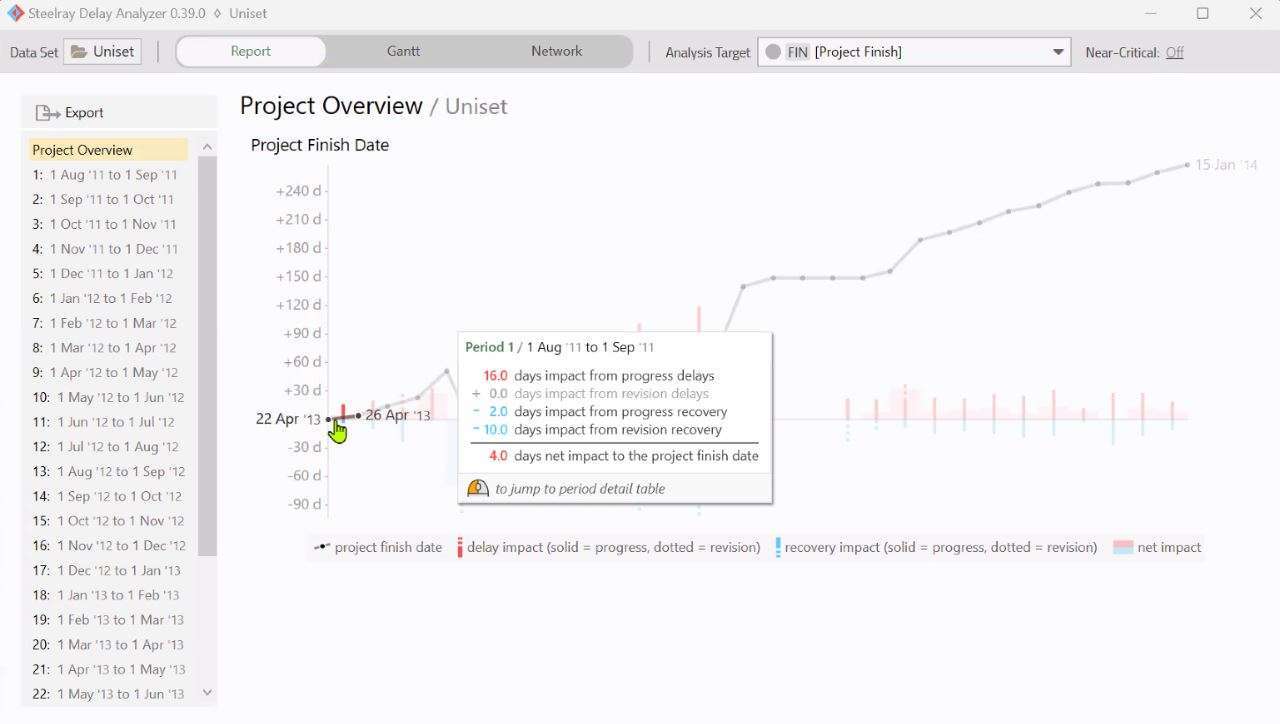
  • An Overview Report summarizes the half-step analysis, showing the total delays and accelerations in each comparison period over time, split by progress-related changes and schedule revisions.
  • Period Detail Reports show exactly which activities caused an impact to the finish date because of progress-related changes like early/late starts/finishes and out-of-sequence execution. A graph maps the impact day by day over the period.
  • Schedule revision summaries show changes to logic, remaining duration, calendars, added/removed activities, etc. Float before and after the change is displayed to help determine whether the change had an impact on the finish date.
  • 3D Gantt where you can drag the data date forward and back through time (as detailed as hour by hour) and see the Gantt change in real time. The Gantt also includes:
    • Delay Overlays which map delays and accelerations onto the WBS and activity bars.
    • Filter the Gantt by longest path, critical, or progress status, including grouping and sorting options.
  • A delay analysis Timeline View which breaks down the delays by day, by week, or by period. This supports our design principle to be transparent.
  • Selectable Analysis Targets allow you to analyze to any activity or milestone in the schedule or simply the project’s finish.
  • Microsoft Excel Report that you can export. The Excel sheet has a tab for the Overview Report (see above) and 2 tabs for each comparison period in the analysis:
    • Period Detail Report (see above)
    • Longest Path Change Analysis, which shows precisely how the longest path changed over the period.
  • Near-Critical Analysis is supported by setting a near critical threshold in the application. The threshold represents the maximum number of hours of float an activity must have to be deemed near-critical.
  • Network Diagram shows the entire schedule as a graph, with custom color filters and annotations showing delays.
Software

Price: 0 $

Price Currency: $

Operating System: Windows

Application Category: Construction

Editor's Rating:
5

Latest update

December 27, 2025

License Price

Price on Request

OS

Windows

Reviews

There are no reviews yet.

Be the first to review “Steelray Half Step Delay 2024 v6.2”

Your email address will not be published. Required fields are marked *

Recommended for You