

Latest update
License Price
OS
TeKton3D is a modular application for the design and integrated calculation of building facilities and justification of compliance with applicable regulations.
Tekton3D enables a BIM shared work environment , very convenient and simple, and without the need for expensive requirements.
Projects within Tekton3D are organized into a ” chapter list “, which are displayed in the bottom window. Each chapter refers to a specific installation of the building or to documents justifying legal requirements.
Organization of building facilities by chapters
Tekton3D alternates quickly and easily between the different sections of the project. This organization allows several facilities to be designed within the same environment, taking into account their interactions and checking any interference that may occur between them.
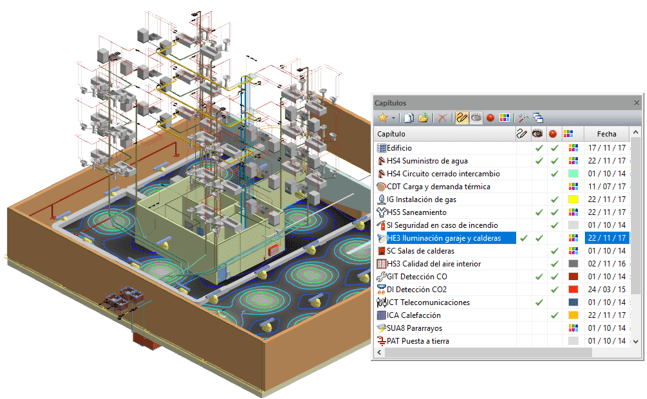
With Tekton3D , the geometric definition or survey of the building is carried out once (through direct exchange with Allplan, IFC exchange , or by importing templates in DXF/DWG ) and is subsequently used as a framework to design and calculate the different facilities.
Tekton3D facilitates plan design, working in a 2D environment, with drawing aid tools: grids or grids adjustable in pitch, origin and angle, orthogonal forcing mode adjustable to the pitch of the grid, capture of characteristic points of entities, etc. But it also allows you to change the point of view to view and work directly in 3D, being able to activate the dynamic view at any time, change points of view and framing while drawing 3D elements and symbols.
Its powerful graphics engine allows the definition and calculation of facilities in three dimensions, allowing the best adjustment of design processes to the reality of the building.
TeKton3D is compatible with 3Dconnexion ‘s SpaceMouse® devices , allowing convenient navigation through the three-dimensional model of the building
One of the countless advantages of Tekton 3D solutions is the possibility of working in simultaneous environments from several networked computers, so that one of the building’s facilities can be designed from each workstation. The information entered by each of the group members will be accessible to the rest instantly.
TeKton3D includes by default extensive libraries with all the symbols defined in the standards and regulations discussed that allow you to easily design the different facilities of the building. However, it is possible to create new 2D and 3D symbols by defining them directly in the program (drawing lines, polylines, circles, arcs, texts, 3D faces, prisms, cylinders, pyramids, spheres, surfaces of revolution, etc.). It also allows the import of new symbols from other CAD programs by exchanging DXF/DWG files, and even by directly importing models from the SketchUp 3D gallery through SKP files .
TeKton3D allows you to trace pipes and conduits by drawing their axes (lines), and when calculating it in solid mode, it will show its calculation dimensions and resolve the joints using accessories.
TeKton3D carries out the sizing and verification of the building facilities, and justifies compliance with the applicable regulations. The entire process is totally transparent and is accompanied by a report generated in calculation time where it is possible to observe the steps it goes through and the incidents that occur.
The errors panel will allow you to review all the incidents that occurred during the calculation process, locate exactly the element where they occur, and make the necessary decision to solve it.
Control the calculation results at all times using the informative labels on the screen, which appear when you hover over any element of the installation.
TeKton3D allows you to carry out shadow studies on the building, visualizing in real time the changes produced in the shadows when changing the current date and time, the orientation of the building with respect to the north, or the location of the building itself (latitude).
TeKton3D allows you to generate a wide variety of details generated from the results of each of the chapters. In this way, it is possible to generate details of the floor plan distribution, details of construction elements, labeled details of 3D projections of the facilities, isolux lighting graphics, principle diagrams, tables with results, even details of 3D views.
With TeKton3D you can design in 3D and automatically obtain project documentation in 2D.
TeKton3D has a powerful tool for generating project plans for direct plotting with which it is possible to create plans in standardized formats, and include one or more details at the scale of those generated for the current chapter.
In addition to the plans and details, TeKton3D generates reports and lists that can be viewed directly in the program and exportable to any word processor.
Lighting calculation results table shown in the TeKton3D Listings tab
TeKton3D allows you to export all the documentation generated by the program to PDF format : details, plans, lists and reports.
TeKton3D enables the export to IFC2X3 or IFC4 format of all the installation elements belonging to the current chapter. It is possible to export any of the available chapters, from the building itself, to any of its facilities (plumbing, sanitation, radiators, ducts, lighting, gas, fire protection, compressed air, etc.)
TeKton3D allows you to classify all the elements of the installation based on standard classification systems ( OmniClass , UniClass, GuBIMclass,… ) or based on classification systems created by the user, and export the files in IFC format with said classification.
In addition, TeKton3D enables the BCF (BIM Collaboration Format) panel to coordinate the building design work with the different agents involved in it.
Price: 0 $
Price Currency: $
Operating System: Windows
Application Category: Oil & Gas Engineering
Latest update
License Price
OS









Reviews
There are no reviews yet.