

Latest update
License Price
OS
Thea for SketchUp is a cutting-edge, physically-based rendering plugin specifically designed to bring photorealistic visualization directly into Trimble SketchUp’s modeling environment. Unlike traditional renderers that operate as separate applications, Thea integrates seamlessly as a native plugin—working directly within SketchUp’s viewport, preserving all geometry, groups, and components without requiring re-exporting. It bridges the gap between conceptual design and high-end presentation by combining multiple state-of-the-art rendering engines (Unbiased, Biased, Presto Hybrid GPU/CPU) within a single, intuitive interface. This flexibility allows artists to choose the perfect balance between interactive speed and final-frame quality, from quick concept previews to production-ready photorealistic animations.
This professional rendering plugin is designed for:
Architects & Architectural Visualizers creating photorealistic renderings directly in SketchUp.
Interior Designers & Space Planners simulating materials, lighting layouts, and furniture arrangements.
Product Designers & Industrial Artists visualizing prototypes with accurate materials and reflections.
3D Visualization Specialists & CG Artists producing cinematic, portfolio-ready imagery.
Landscape Architects & Urban Planners creating immersive environmental visualizations.
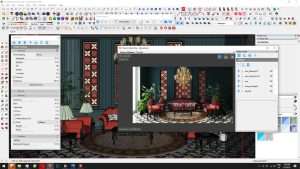
Biased & Unbiased Rendering: Choose between fast Biased engines for production speed or Unbiased path tracing for physically accurate results.
Presto Hybrid Engine: GPU+CPU hybrid rendering using CUDA or OpenCL for ultra-fast previews and high-quality final renders.
Adaptive Sampling: Intelligently focuses computational power on noisy areas to accelerate clean results.
Interactive Region Rendering (IRR): Real-time rendering directly within SketchUp viewport with live updates to materials, lighting, and geometry.
Node-Based Material Editor: Supports layering, procedural textures, reflections, refractions, subsurface scattering, displacement, and coatings.
PBR Workflow: Full support for roughness, metalness, and normal maps with seamless integration.
Comprehensive Preset Library: Ready-to-use photorealistic materials including glass, metals, plastics, wood, stone, and fabrics.
SketchUp Material Sync: Direct conversion and bidirectional synchronization with SketchUp’s native materials.
Full Spectrum Light Types: Point, spot, IES profiles, mesh emitters, and HDRI-based environment lighting.
Physical Sun & Sky: Accurately simulates natural daylight based on geographic location, date, and time.
Adaptive Relighting: Post-render adjustment of light intensity and color without re-rendering.
HDR Environment Maps: Dome and spherical HDR support for realistic sky and environmental lighting.
Physical Camera: Simulates real-world camera parameters (ISO, shutter speed, f-stop).
Depth of Field (DOF): Photographic focus and bokeh effects for cinematic realism.
Motion Blur: Supports moving objects and camera motion for realistic animation renders.
Color Mapping & LUTs: Apply exposure curves, filmic looks, and LUT profiles directly within the renderer.
Proxy Support: Import and render extremely detailed models (trees, cars, furniture) without overloading SketchUp viewport.
Instancing: Efficient duplication of objects while maintaining minimal memory footprint.
Displacement & Clipping: Precise surface elevation and geometry cutaway effects for advanced visualization.
AI Denoiser: Integrated artificial intelligence denoising for noise-free results and accelerated production.
Render Channels (AOVs): Alpha, depth, shadow, reflection, material ID, and more for flexible post-production compositing.
Color Grading: Adjust exposure, contrast, saturation, and apply filters directly within Thea.
SketchUp Animation Support: Fully compatible with native scene animations and camera transitions.
Batch Rendering: Automated rendering of multiple scenes or views.
Section Cut Rendering: Native SketchUp section cuts rendered with proper visualization.
Light Animation: Animate light sources for realistic time-lapse presentations.
Enhanced Presto Engine: Optimized CUDA/OpenCL kernels for faster hybrid rendering on latest NVIDIA and AMD GPUs.
Improved Material Translation: Better accuracy when converting SketchUp materials to Thea PBR shaders.
Advanced AI Denoiser: Upgraded deep learning model for cleaner results with fewer samples.
Expanded IES Library: Additional manufacturer photometric light profiles.
Streamlined UI: Redesigned render settings panel and workflow optimizations.
SketchUp 2025 Compatibility: Full support for latest SketchUp release features.
OS: Windows 10/11 (64-bit)
Host Software: Trimble SketchUp (Make and Pro) 2020, 2021, 2022, 2023, 2024, or 2025 (x64)
Price: 125 $
Price Currency: $
Operating System: Windows
Application Category: Architecture
Latest update
License Price
OS




Reviews
There are no reviews yet.