

Latest update
License Price
OS
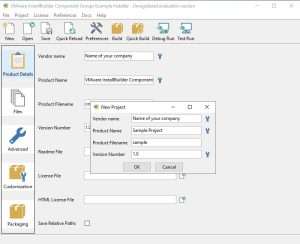
VMware InstallBuilder Enterprise is a powerful, cross-platform installer development tool that enables software teams to create professional, feature-rich installation packages for desktop and server applications across Windows, macOS, Linux, and Solaris. Designed for developers by developers, InstallBuilder simplifies the complex process of creating installers while providing the flexibility, customization, and automation capabilities that enterprise software distribution demands.
Version 26.2 continues the tool’s legacy of reliability and versatility, offering comprehensive platform support, customizable branding, automated updates, seamless CI/CD integration, and enterprise-grade security features—all from a single, maintainable XML project file. For organizations serious about software distribution, InstallBuilder Enterprise delivers the professional installation experience that users expect and the automation capabilities that development teams require.
This professional installer development tool is designed for:
Software Developers & Engineering Teams creating professional, cross-platform installers for desktop and server applications.
DevOps Engineers & Release Managers automating software deployment through CI/CD pipelines.
ISVs (Independent Software Vendors) distributing applications across Windows, macOS, and Linux platforms.
Enterprise IT Teams packaging internal applications for deployment across corporate environments.
Product Managers & Release Engineers ensuring consistent, branded installation experiences for end users.
Operating Systems:
Windows: Windows 7, 8.1, 10, 11 (32-bit and 64-bit)
macOS: All modern versions
Linux: Major distributions (Debian, Red Hat, Ubuntu, etc.)
Solaris: Supported architectures
Architectures:
x86 (32-bit)
x64 (64-bit)
ARM (including Apple Silicon)
Multi-architecture support in single installer
Branding & Visual Identity:
Custom logos and splash screens
Branded color schemes and themes
Welcome and finish images
Consistent look across all platforms
User Interface Control:
Wizard-style or silent installation
Custom dialog creation
User input collection
License agreement display
Installation directory selection
Component selection screens
Custom Actions:
Pre-install and post-install scripting
Support for multiple scripting languages
Conditional execution based on system state
File and registry operations
Service installation and control
Environment variable configuration
Dependency Management:
Prerequisite checking
Automatic dependency installation
Framework and runtime verification
Version compatibility validation
Built-In Updater:
Integrated update checking
Automatic download and installation
Delta updates for smaller downloads
Silent update capability
User notification options
Update Management:
Version comparison
Update server configuration
Rollback support
Update channel management (stable/beta)
Network Deployment:
Silent installation support
Unattended deployment options
Mass deployment across networks
Integration with systems management tools
Server Applications:
Headless installation
Service configuration
Database setup integration
Web server configuration
Code Signing:
Windows Authenticode signing
macOS code signing and notarization
Digital signature verification
Trusted installer identity
Secure Installation:
Encrypted packages
Checksum verification
Secure download protocols
Installation integrity validation
Build Automation:
Command-line interface
Headless build capability
Integration with Jenkins, GitLab CI, Bamboo
Version control friendly (XML project files)
Continuous Delivery:
Automated installer generation
Build pipeline integration
Artifact management
Release automation
Windows Formats:
EXE installers
MSI packages
Bundle installers
macOS Formats:
DMG disk images
PKG installers
App bundles
Linux Formats:
RPM packages
DEB packages
Shell scripts
Tar.gz archives
Additional Formats:
Cross-platform executables
Web installers
Offline installers
Single XML Project File:
All configuration in one file
Version control friendly
Easy to diff and merge
Portable across systems
Debugging Tools:
Built-in debugger
Logging and diagnostics
Test mode
Error reporting
Templating:
Reusable project templates
Multi-language support (i18n)
Platform-specific variations
Automatic backup of previous version
Safe uninstall capability
Failed installation recovery
System state restoration
User data preservation
Detailed installation logs
Error tracking and reporting
Audit trail for compliance
Debug information for support
Enhanced ARM Support – Improved native support for Apple Silicon and ARM-based Windows devices
CI/CD Integration Updates – Tighter integration with modern CI/CD platforms
Security Enhancements – Updated code signing and encryption capabilities
Performance Optimizations – Faster build times and smaller installer sizes
New Platform Support – Latest Windows, macOS, and Linux versions
UI/UX Refinements – Modernized installer templates and branding options
Debugging Improvements – Enhanced diagnostic and troubleshooting tools
Stability Enhancements – Bug fixes and reliability improvements
OS: Windows 7, 8.1, 10, or 11
RAM: 2 GB (4 GB recommended)
Storage: 400 MB free space
Additional: Build system capable of running development tools
Price: 125 $
Price Currency: $
Operating System: Windows
Application Category: Software Development
Latest update
License Price
OS







Reviews
There are no reviews yet.