

Latest update
License Price
OS
Wondershare Filmora is the most popular entry-to-mid-level video editing software worldwide—designed to make professional-quality video creation accessible to everyone. Unlike complex, expensive editing suites that require extensive training, Filmora focuses on intuitive drag-and-drop workflows, a clean timeline interface, and an extensive library of built-in effects, transitions, titles, and music.
Version 15.2.5.17803 continues this tradition while introducing enhanced AI-powered tools, expanded effect libraries, and performance optimizations that enable smooth editing even on mid-range hardware. Whether creating YouTube videos, social media content, tutorials, or marketing materials, Filmora delivers the essential tools creators need—without overwhelming them with unnecessary complexity.
This accessible video editing software is designed for:
YouTube Creators & Content Producers creating engaging videos with titles, transitions, and effects.
Educators & Trainers producing tutorials, screen recordings, and instructional content.
Small Business Owners & Marketers creating promotional videos, social media content, and advertisements.
Social Media Influencers crafting polished videos for TikTok, Instagram, and other platforms.
Beginners & Hobbyists learning video editing without the complexity of professional-grade tools.
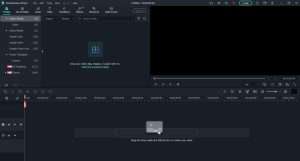
Clean Timeline Design:
Drag-and-drop clip placement
Multiple video and audio tracks for layered editing
Easy splitting, trimming, and merging tools
Visual timeline with thumbnail previews
Beginner-Friendly Layout:
Minimal clutter with context-sensitive tools
Clear iconography and tooltips
Customizable workspace
Undo/redo for experimentation without fear
Core Editing Functions:
Cut, trim, split, and merge video clips
Adjust clip speed (slow motion, fast motion, reverse)
Rotate, crop, and flip video
Pan and zoom effects (Ken Burns style)
Multi-Track Timeline:
Simultaneous management of video, audio, and effects layers
Independent track control
Synchronization tools for multi-camera projects
4K Video Support:
Full resolution editing for high-definition content
Smooth playback on recommended hardware
Export at up to 4K resolution
Built-In Content Library:
Hundreds of transitions (dissolve, wipe, zoom, 3D)
Filters and color grading presets
Titles and lower thirds with animations
Overlays and animated elements
Filmstock Integration:
Access to thousands of additional effects
Royalty-free music and sound effects
Stock video footage
Advanced effect packs
Special Effects:
Green screen (chroma key) compositing
Split-screen templates
Picture-in-picture (PIP) effects
Motion tracking for text and graphics
Audio Enhancement:
Built-in equalizer and audio mixer
Noise removal and audio denoise
Auto ducking (automatically lower background music during dialogue)
Audio synchronization
Royalty-Free Audio:
Extensive library of music tracks
Sound effects for various applications
No attribution required for most content
AI Tools (Newer Versions):
Auto scene detection
Smart trim and reframe
AI portrait recognition and effects
Auto beat sync for music-driven edits
AI Enhancements:
Automated color correction suggestions
Intelligent clip organization
Voice isolation for cleaner dialogue
Motion Tracking:
Track moving objects in video
Attach text, graphics, or effects to tracked motion
Perfect for blurring faces or adding context
Keyframing:
Precise control over clip properties over time
Create custom animations
Adjust position, scale, opacity, rotation
Screen Recording:
Capture screen activity with or without webcam
Ideal for tutorials and gaming content
Simultaneous system audio and microphone recording
Color Tools:
Basic adjustments (exposure, contrast, saturation)
White balance correction
LUT (Look Up Table) support
Color grading presets for cinematic looks
Platform Presets:
Export settings optimized for YouTube, TikTok, Instagram
Vertical video support for mobile platforms
Aspect ratio templates (16:9, 9:16, 1:1, 4:5)
Quick sharing to social platforms
Output Options:
Export to MP4, MOV, AVI, MKV, GIF, and more
Device presets (smartphones, tablets, game consoles, TVs)
Custom resolution, bitrate, and frame rate
Direct upload to YouTube and Vimeo
Enhanced AI Tools – Improved scene detection and smart editing capabilities
Expanded Effects Library – New transitions, filters, and titles added
Performance Optimizations – Smoother timeline performance for 4K projects
Audio Ducking Improvements – More precise background music management
Export Speed Enhancements – Faster rendering with GPU acceleration
UI Refinements – Streamlined workflow with improved tool organization
Bug Fixes – Stability improvements across all features
Format Support Updates – Compatibility with latest camera and device formats
OS: Windows 7/8/10/11 (64-bit)
CPU: Intel i3 or better multicore processor (2 GHz or above)
RAM: 4 GB
Graphics: Intel HD Graphics 5000 or later
Storage: 10 GB free space
Display: 1366 × 768 resolution
Price: 125 $
Price Currency: $
Operating System: Windows
Application Category: Video
Latest update
License Price
OS









Reviews
There are no reviews yet.