

Latest update
License Price
OS
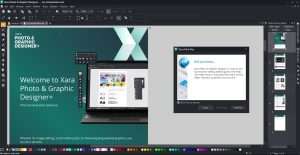
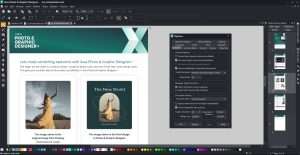
Xara Photo & Graphic Designer+ is a remarkably fast and versatile creative suite that combines professional photo editing, vector illustration, graphic design, and page layout capabilities in a single, intuitive application. Developed by Xara Group Ltd. and distributed by MAGIX Software GmbH, this software stands apart from traditional design tools by offering a unique hybrid workflow—seamlessly combining vector graphics and bitmap image editing in real-time, with unprecedented speed and responsiveness. Version 25.1.0.72372 continues Xara’s legacy of delivering professional-grade creative tools without the complexity and steep learning curve of traditional design applications. Whether retouching photos, creating logos, designing marketing materials, or preparing graphics for web and print, Xara Photo & Graphic Designer+ delivers the power, precision, and performance that creative professionals demand.
This professional creative software is designed for:
Graphic Designers & Illustrators creating vector artwork, logos, and marketing materials with precision and speed.
Photographers & Photo Editors enhancing, retouching, and manipulating images with professional-grade tools.
Small Business Owners & Marketers designing promotional materials, social media graphics, and branding assets.
Digital Artists & Creative Enthusiasts combining photography and illustration in unique creative projects.
Print & Web Designers producing high-quality output for both traditional and digital media.
Non-Destructive Workflow:
Edit images without permanently altering original files
Experiment freely with unlimited undo
Preserve original quality while exploring creative options
Comprehensive Adjustment Tools:
Brightness, contrast, exposure, and color correction
Advanced sharpening and blur effects
Red-eye removal and spot healing
Crop, rotate, and straighten tools
Automatic photo enhancement and optimization
Retouching & Restoration:
Skin smoothing and blemish removal
Object removal with content-aware tools
Clone and heal tools for precise corrections
Repair old or damaged photographs
RAW Support:
Process RAW files from major camera manufacturers
Maintain maximum image quality
Professional-grade RAW conversion
Precision Drawing:
Freehand and shape-based drawing tools
Complete node and curve editing for perfect control
Boolean operations for combining and modifying shapes
Infinite scaling without quality loss
Creative Vector Features:
Gradient fills, transparency, and pattern fills
Live effects with real-time preview
Artistic brushes and stroke styles
Text on paths and shapes
Shape Creation:
Quick shape tools with customizable parameters
Complex shape building through Boolean operations
Symbol and reusable element libraries
Grid and alignment tools for precision
Professional Page Layout:
Multi-page document support for brochures and catalogs
Master pages for consistent design across documents
Advanced alignment, distribution, and snapping tools
Rulers, grids, and guides for precise positioning
Layer-Based Workflow:
Comprehensive layer management
Non-destructive layer editing
Blend modes and opacity controls
Group and organize complex designs
Template Library:
Hundreds of professionally designed templates
Templates for business cards, flyers, posters, social media
Fully customizable to match brand identity
Quick-start designs for common projects
Advanced Text Controls:
Artistic text and paragraph text support
Character and paragraph formatting
Kerning, tracking, and leading adjustments
OpenType feature support
Creative Text Effects:
Text on curved paths and shapes
Text shadows, outlines, and glows
Gradient and texture fills for text
3D text effects and extrusions
Font Management:
Font preview and selection tools
System font integration
Web font support
Live Effects:
Real-time preview of all effects
Shadows, bevels, glows, and reflections
Artistic filters and stylization
Lens effects and distortions
Blend Modes:
Comprehensive blend mode library
Creative compositing options
Transparency and opacity controls
Effect Combinations:
Build custom effect chains
Save and reuse effect combinations
Non-destructive effect application
Seamless Compositing:
Combine vector graphics and photos effortlessly
Background removal tools
Masking and clipping for precise control
Advanced layering for complex compositions
Image Manipulation:
Warp and distort tools
Perspective correction
Cut-out and extraction tools
Photo montage creation
Real-Time Rendering:
Instant preview of all edits and effects
No waiting for screen redraws
Smooth zooming and panning even with complex documents
Live effect updates as you adjust parameters
Lightweight & Efficient:
Minimal system resource usage
Fast startup and file loading
Responsive even on modest hardware
Optimized for productivity
Import Formats:
PNG, JPG, BMP, TIFF, GIF
RAW camera files
PSD for Photoshop compatibility
SVG vector graphics
Export Options:
PDF for professional printing
Optimized web graphics (PNG, JPG, SVG)
Social media format presets
Print-ready file preparation
Print-Ready Output:
CMYK color support
Bleed and crop mark settings
High-resolution export
Professional print preparation
Web Graphics:
Pixel-perfect design for screens
Banner, button, and icon creation
Social media graphic templates
Optimized export for web use
UI/UX Elements:
Interface element design
Icon and button creation
Web asset preparation
Enhanced Photo Editing Tools – Improved non-destructive workflow with new adjustment options
Faster Vector Rendering – Optimized performance for complex illustrations
Expanded Effect Library – New creative filters and artistic effects
Template Library Updates – Dozens of new professionally designed templates
RAW Format Support – Compatibility with latest camera RAW formats
UI/UX Refinements – Streamlined interface with improved workflow
Export Enhancements – Additional format options and presets
Stability Improvements – Bug fixes and reliability enhancements
OS: Windows 10 or Windows 11 (64-bit)
Processor: Intel or AMD processor, 1 GHz or higher
RAM: 2 GB (4 GB recommended)
Storage: 500 MB available disk space
Graphics: Onboard graphics with minimum 1280 × 768 resolution
Internet: Required for activation and updates
OS: Windows 11 (64-bit)
Processor: Multi-core Intel or AMD processor
RAM: 8 GB or more
Storage: SSD for faster performance
Display: 1920 × 1080 resolution or higher
Price: 125 $
Price Currency: $
Operating System: Windows
Application Category: Graphics
Latest update
License Price
OS






Reviews
There are no reviews yet.