
Grafcet Studio Pro is a specialized professional software environment dedicated to the design, simulation, and documentation of automation sequences using the GRAFCET methodology (also standardized as Sequential Function Chart – SFC in IEC 61131-3). Unlike general-purpose PLC programming software, it focuses exclusively on the graphical creation of step-transition diagrams, which are the blueprint for sequential industrial processes (e.g., packaging machines, assembly lines, batch processes). The software allows engineers to visually model the logic, simulate it offline to verify behavior, and then generate structured text (ST) or ladder logic (LD) code for direct import into PLCs from various manufacturers.
It bridges the gap between high-level process design and low-level PLC coding, improving clarity, reducing errors, and streamlining the commissioning of automated systems.
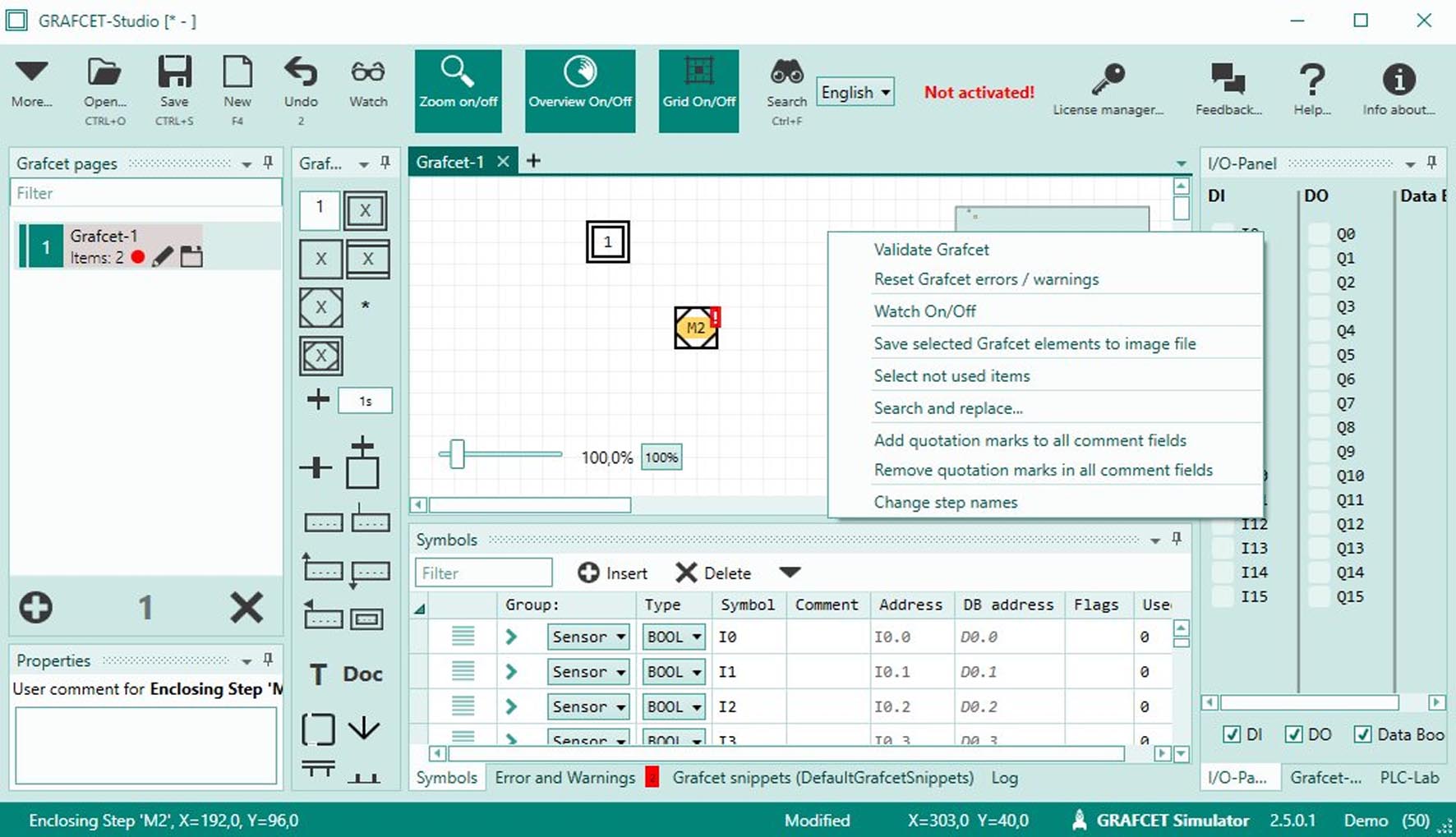
Grafcet Studio Pro is built around the GRAFCET/SFC standard, providing a complete toolchain for automation design.
Visual Programming & Editing:
Intuitive Diagramming: Drag-and-drop interface for creating steps (actions), transitions (conditions), and links. Supports divergence (parallel branches) and convergence.
Hierarchical Design: Create sub-GRAFCETs to break down complex processes into manageable, reusable modules.
Animation: Steps and transitions are visually highlighted during simulation to follow the active sequence.
Simulation & Debugging:
Full Offline Simulation: Test the complete logic of your GRAFCET diagram without any physical PLC. Manually trigger transition conditions or use scripted scenarios.
Watch Windows & Debugging: Monitor variables, force inputs, and step through the sequence to validate logic and troubleshoot before deployment.
Code Generation & PLC Integration:
Automatic Code Export: Translates the graphical GRAFCET diagram into executable PLC code. Primary output is in Structured Text (ST) per IEC 61131-3.
Vendor-Neutral & Vendor-Specific: Can generate generic code or tailored code for specific PLC platforms (Allen-Bradley, Schneider Electric, Siemens via intermediate formats or add-ons).
Documentation Generation: Automatically produces detailed technical documentation from the diagram, including step/transition lists and cross-references.
Advanced Features:
Supervision Links: Interface design elements to create simple HMIs (Human-Machine Interfaces) for simulation and operator training.
Recipe Management: Handle parameter sets for different production runs.
Version Control & Comparison: Manage different versions of your automation projects.
Used to design control logic for:
Machine Automation: Palletizers, fillers, CNC loaders.
Process Automation: Chemical batch processes, water treatment stages.
Building Automation: Elevator control sequences, HVAC staging.
As a Windows-based engineering application, it has moderate requirements. The minimum system requirements are Windows 7/8/10 (32 or 64-bit), a 1 GHz processor, 2 GB of RAM, 500 MB of free disk space, and a display with 1024×768 resolution.
For recommended professional use for comfortable work on large, complex projects, a system with Windows 10/11 Pro (64-bit), a multi-core processor (Intel i5 or equivalent), 8 GB of RAM, an SSD, and a 1920×1080 display is advised.
Price: 125 $
Price Currency: $
Operating System: Windows
Application Category: Automation






Reviews
There are no reviews yet.